.png)
Only users with Jira Admin permissions can change the time tracking provider.
Time Tracking Provider in Jira Cloud
The Time Tracking Provider module allows an app to replace Jira’s native time tracking features with its own interface.
You can set Teamboard ProScheduler as your time tracking provider in Jira Cloud to seamlessly sync time logs between Teamboard and Jira, ensuring accurate and consistent time tracking across both platforms.
When Teamboard ProScheduler is selected as the time tracking provider:
-
Jira’s default Log work button is hidden
-
The native Time tracking issue panel is suppressed
-
The Work logs issue tab is removed
However, time tracking APIs will remain available
How to Change Your Time Tracking Provider
-
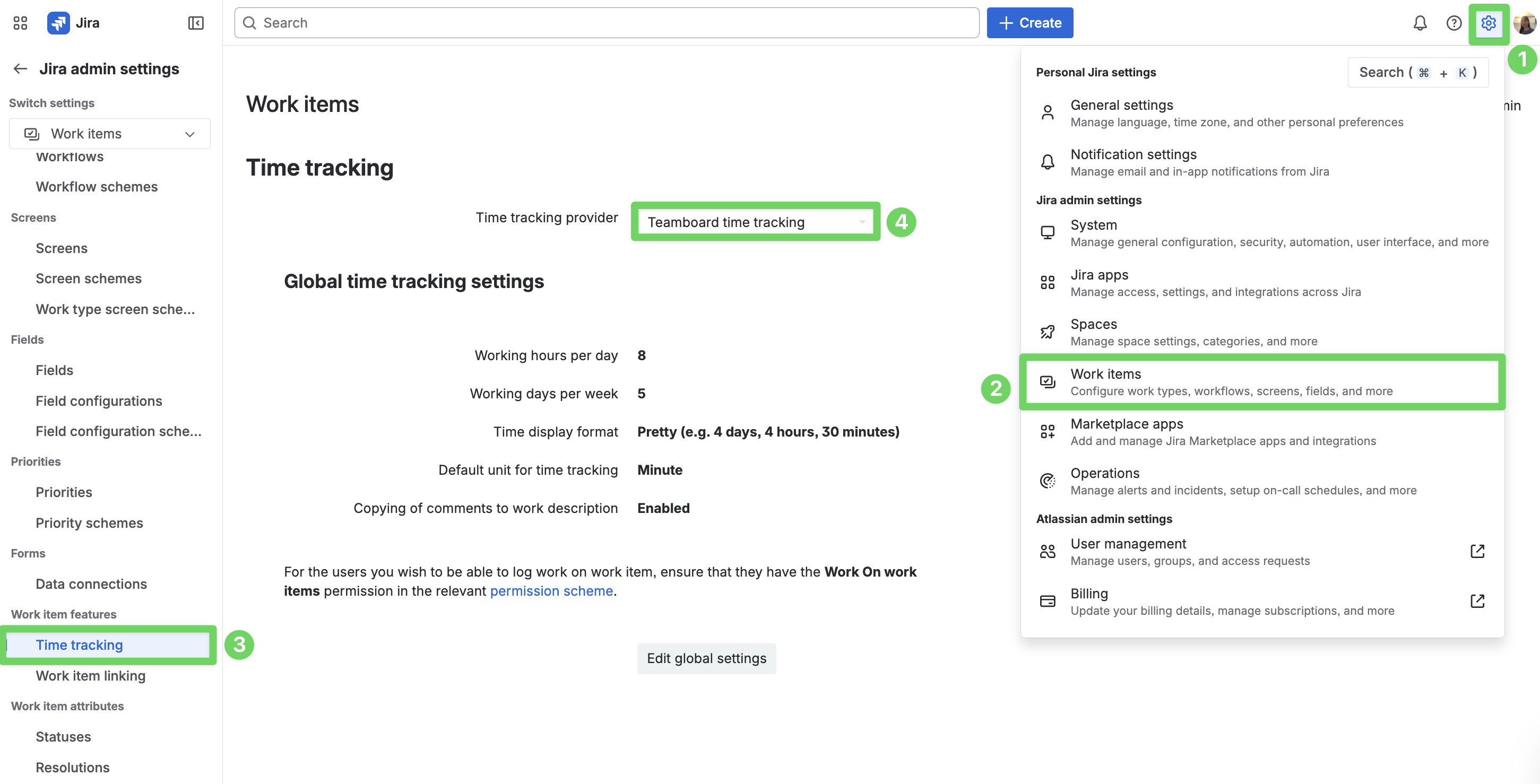
Navigate to ⚙️ settings from the top-right screen.
-
Select Work items.
-
In the sidebar, select Time tracking under Work items features.
-
Choose Teamboard time tracking from the time tracking provider dropdown.