.png)
The Kanban board in ProductGo is made up of several key components that work together to help you manage tasks effectively. Each component is customizable to fit your team’s workflow and needs.
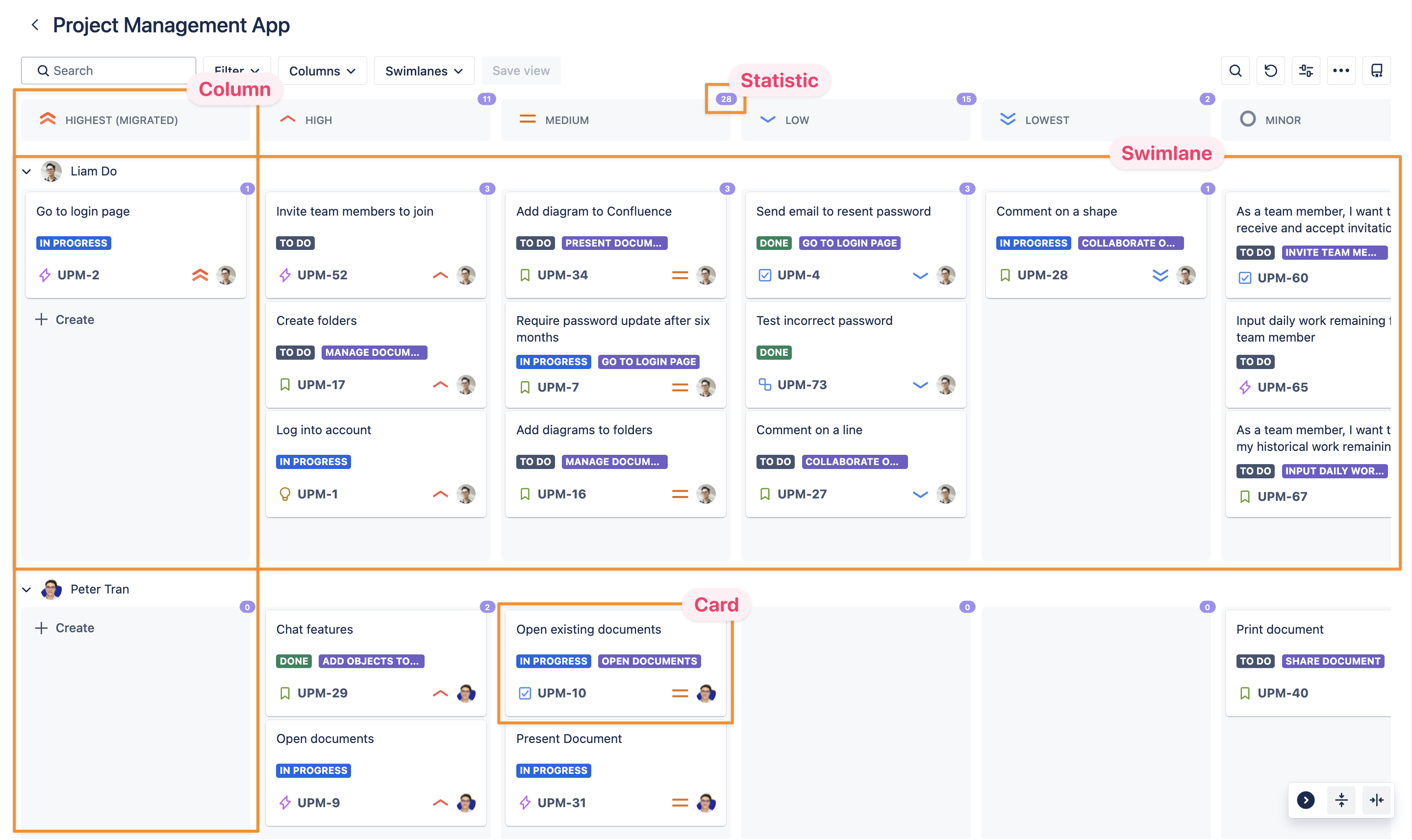
Columns
Columns represent the stages in your workflow. They can be customized to reflect any field in your Jira instance, such as project phase, priority, or team.
Swimlanes
Swimlanes organize tasks within each column. Like columns, swimlanes can be customized to group tasks by criteria such as assignee, project, or priority.
Cards
Cards represent individual tasks. Each card displays key details such as assignee, due date, status, etc.
Statistics
Statistics give you an overview of task distribution.
How They Work Together
The components – columns, swimlanes, cards, and statistics – work in tandem to provide a clear and organized view of your workflow.
Columns and swimlanes help you visually categorize tasks, while cards give you detailed information about each item. The statistics offer valuable insights into your team's progress.
Together, these components make it easy to manage tasks, track progress, and stay organized.