.png)
This guide explains the basic structure of a TestNG XML report, helping you understand how AgileTest reads and displays report data. Additionally, you can learn how to customize the report to add attachment details.
1. Common structure of TestNG report
Below is the common structure of the TestNG XML report.
In the TestNG report, the structure starts with the <testng-results> element containing multiple <suite> elements. Each suite contains one or more <test> elements, and within each test, there are multiple <class> elements. Inside each class, the test methods are represented by the <test-method> elements.
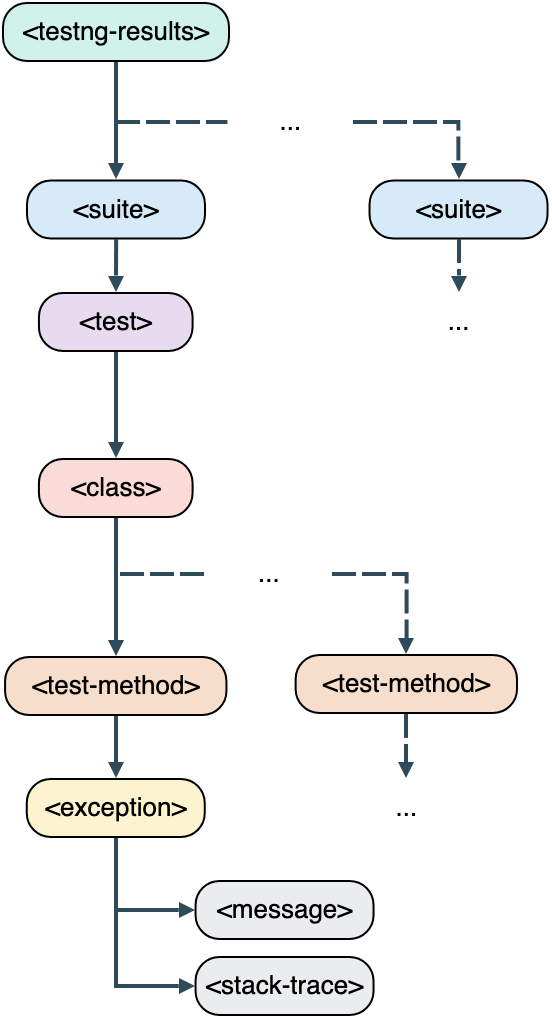
In a basic TestNG report, you should find common tags depicting test suites and test cases.
Once you understand the structure of a TestNG report, the next step is to see how AgileTest interprets this data when the report is imported. AgileTest reads specific elements in the XML file to create test cases and determine their execution status.
2. How AgileTest would parse a TestNG report
Imported Test cases differ from each other by name attributes of <class> element and <test-method> element parsed from the XML file. The combination of these attributes is called Test definition in AgileTest. User should find it right under the Description area of Test case tickets. The Summary of each Test case issue will be the value of name attribute.
Each report file, after execution, contains TestNG status values automatically mapped to AgileTest Test Results. Therefore, you do not need extra setup to read test results.
Below are explanations for the supported status of the TestNG reports in AgileTest.
Prioritization rule for determining the test status in AgileTest:
-
If multiple tags are added to a single
<test-method>element, the tag with the highest priority will be used as the test status in AgileTest. -
The priority of status tags in AgileTest is as follows: failed > blocked > retest > skipped > query > Passed .
In the TestNG report, test case status is calculated based on the status tag in the test-method tag. The following table shows how TestNG status values are mapped to AgileTest execution statuses.
|
Test case status |
Description |
|
|
Passed → Test case yields the expected result. |
|
|
failed → Test case returns the actual result, not as expected. |
|
|
blocked → Test case is considered blocked due to a specific reason. |
|
|
skipped → Test case is skipped in the test run. |
|
|
retest → Test case should be rerun again. |
|
|
query → The test case requires more details to have the final result. |
|
|
todo → Test case is not yet run. It’s the default status of every Test case in AgileTest. |
3. Test Result with attachments
By default, many reports do not include attachments. This section explains how to add attachments to your test reports.
AgileTest supports 2 customized structures for integrating attachments into your TestNG test reports. Users can choose either option to upload test results along with evidence files.
3.1 Attachment element with name attribute and content inside
To allow AgileTest to recognize attachments in the report, you need to follow a specific XML element structure.
<attachment name="filename"> base64 content </attachment>
For example, you can put this Element structure into your report like this:
<test-method>
  ....
  <attachments>
    <attachment name="test.png">iVBORw0KGgoAAAANSUhEUgAAADIAAAAyCAYAAAAeP4ixAAAAQ0lEQVR42u3PQREAAAgDINc/9Mzg14MGZNrOAxERERERERERERERERERERERERERERERERERERERERERERERERERuVh9TJWdbWjzsQAAAABJRU5ErkJggg==</attachment>
  </attachments>
</test-method>
3.2 Attachment element with separate name and content elements inside
To allow AgileTest to recognize attachments in the report, you can add this element structure:
<attachment>
  <name>filename</name>
  <rawcontent> base64 content </rawcontent>
</attachment>
For example, your report will look like:
<test-method>
  ....
  <attachments>
    <attachment>
      <name>test.png</name>
      <rawcontent>iVBORw0KGgoAAAANSUhEUgAAADIAAAAyCAYAAAAeP4ixAAAAQ0lEQVR42u3PQREAAAgDINc/9Mzg14MGZNrOAxERERERERERERERERERERERERERERERERERERERERERERERERERuVh9TJWdbWjzsQAAAABJRU5ErkJggg==</rawcontent>
    </attachment>
  </attachments>
</test-method>
Should you need any assistance or further AgileTest inquiries, please contact us here!