Azure DevOps is a cloud computing platform developed by Microsoft that provides a wide range of services for computing, storage, networking, and artificial intelligence. With Azure DevOps, individuals and organizations can build, deploy, and manage applications and services in a flexible, scalable, and secure environment.
Prerequisite:
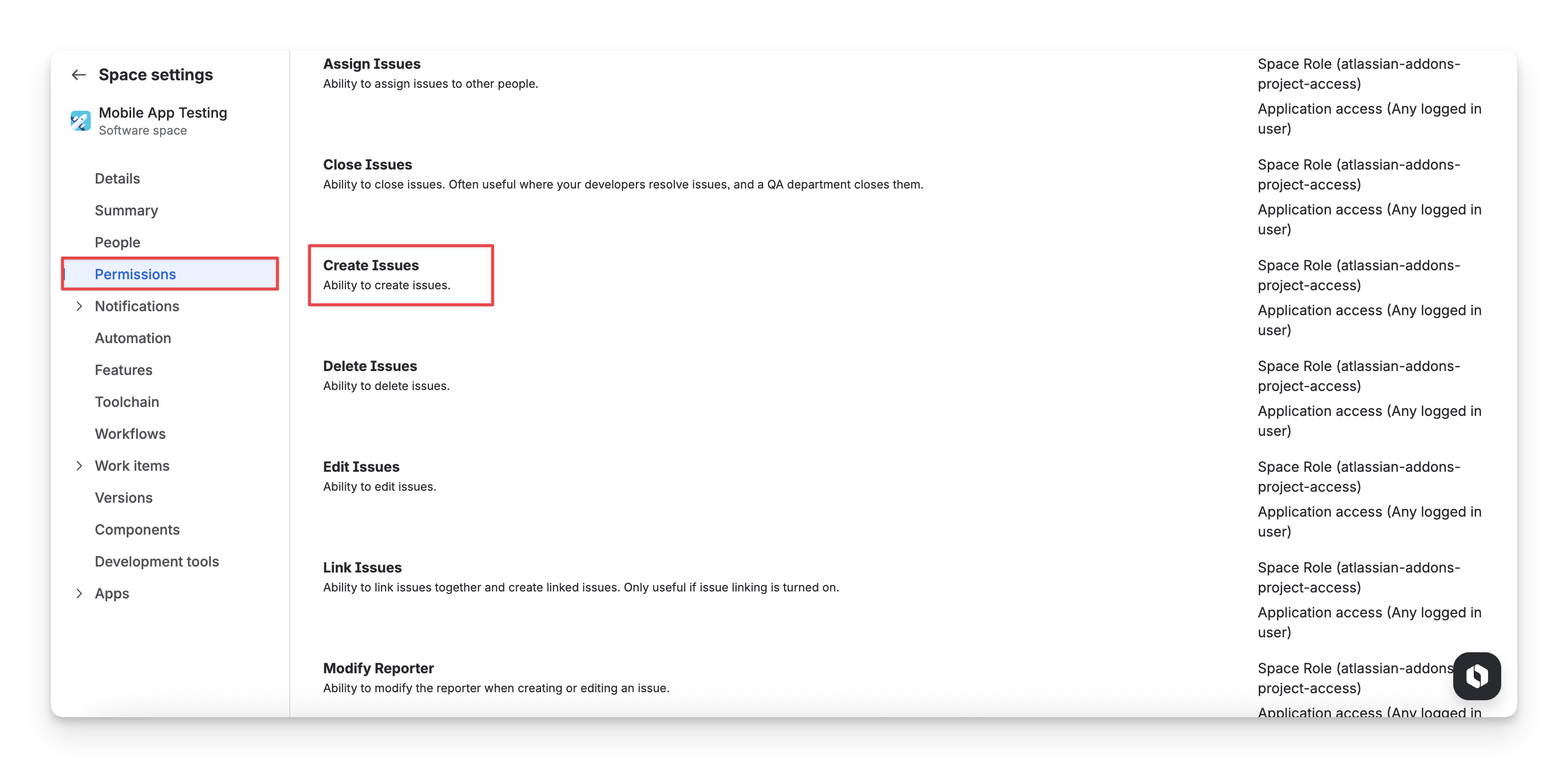
Make sure your account has permission to create TestCase and TestExecution issues; otherwise, the import will fail.
As a Jira admin , you can update this permission in the Space setting → Permission → Create Issues.
For the Cloud version, Client id and Client secret are needed. Please refer to this instruction to get them: API integration
For Data Center version, you will need a Personal access token (PAT) instead. In Jira, select ⚙️ (top right corner) → System -> Administering personal access tokens, and create yourself a token. Please refer to this article
When you integrate AgileTest with Bitbucket, you need to securely store certain authentication details, such as your Client ID and Client Secret . By doing it, you ensure that sensitive data is kept secure and is not exposed in your code or logs, reuse variables in different places, etc. These credentials are also required for AgileTest to authenticate and communicate with Azure DevOps in the pipeline.
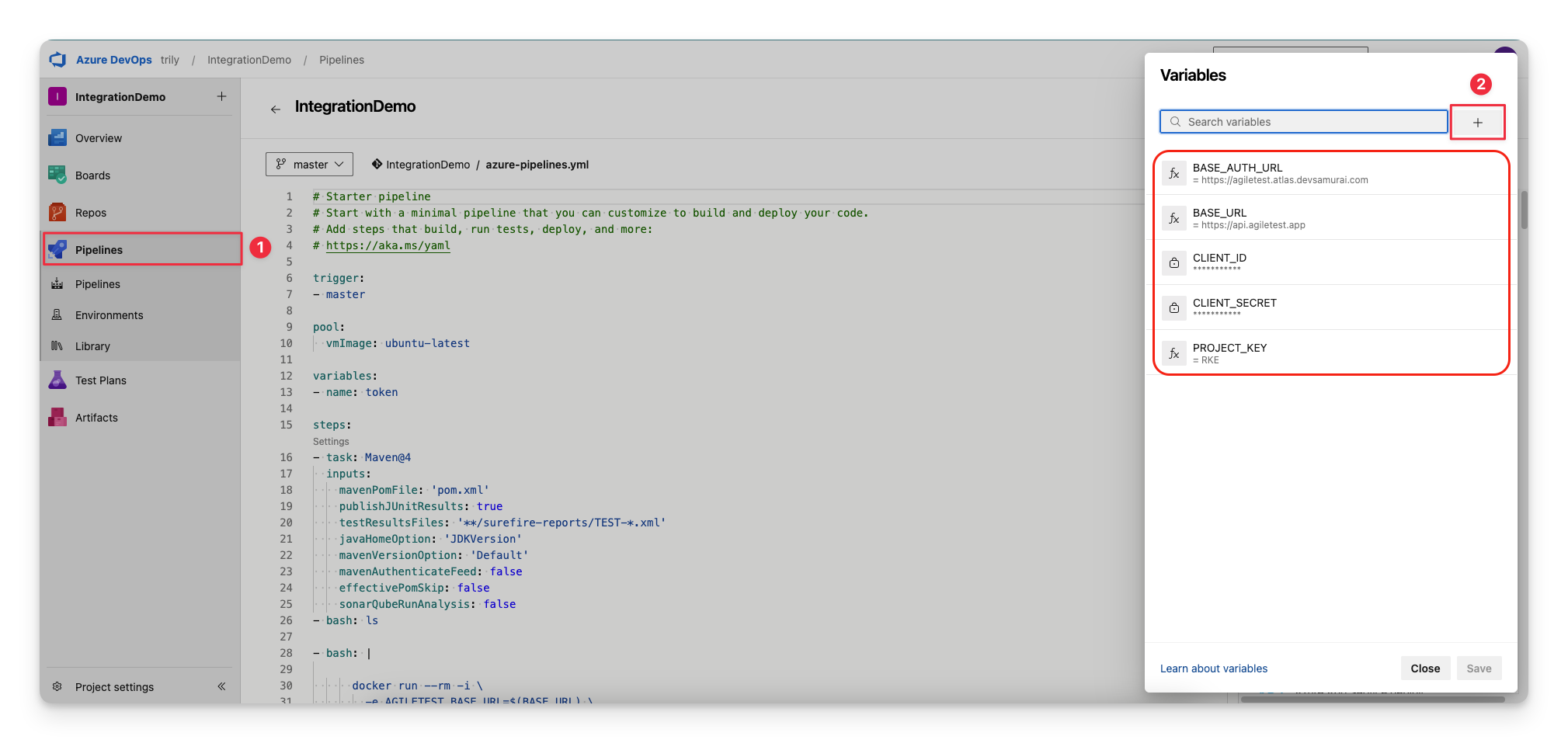
We recommend that you set up 5 repository variables:
Variables
Description
Is secured
Example
BASE_AUTH_URL
Base URL used for requesting authenticating token
https://agiletest.atlas.devsamurai.com
BASE_URL
Base URL to submit your report to
https://api.agiletest.app
CLIENT_ID
The client id that you have requested earlier
✅
******
CLIENT_SECRET
The client secret that you have requested earlier
✅
******
PROJECT_KEY
Your project key
RKE
In case you are working with AgileTest Data Center version, you only need 3 variables as follows.
Variables
Description
Is secured
Example
DC_TOKEN
Your Personal access token
✅
BASE_URL
Base URL to submit your report to
PROJECT_KEY
Your project key
RKE
To set up these variables, follow these steps:
Click on the Pipelines in the left-hand side menu bar.
Click the “Add ” button and enter details.
After you have set up the Azure repository, you can prepare the YAML file in Azure to connect AgileTest with this tool and upload the test results.
You can have your report in different types of test frameworks. Here is a sample JUnit report to play around with.
JUnit report example
<?xml version="1.0" encoding="UTF-8"?>
<testsuite xmlns:xsi="http://www.w3.org/2001/XMLSchema-instance" xsi:noNamespaceSchemaLocation="https://maven.apache.org/surefire/maven-surefire-plugin/xsd/surefire-test-report-3.0.xsd" version="3.0" name="calculateTest" time="0.005" tests="2" errors="0" skipped="0" failures="0">
<properties>
<property name="java.specification.version" value="17"/>
<property name="sun.jnu.encoding" value="UTF-8"/>
<property name="java.class.path" value="/Users/thachnguyen/Work/autotest/JunitAgileTestDemo/target/test-classes:/Users/thachnguyen/Work/autotest/JunitAgileTestDemo/target/classes:/Users/thachnguyen/.m2/repository/org/junit/jupiter/junit-jupiter-api/5.8.2/junit-jupiter-api-5.8.2.jar:/Users/thachnguyen/.m2/repository/org/opentest4j/opentest4j/1.2.0/opentest4j-1.2.0.jar:/Users/thachnguyen/.m2/repository/org/junit/platform/junit-platform-commons/1.8.2/junit-platform-commons-1.8.2.jar:/Users/thachnguyen/.m2/repository/org/apiguardian/apiguardian-api/1.1.2/apiguardian-api-1.1.2.jar:/Users/thachnguyen/.m2/repository/org/junit/jupiter/junit-jupiter-engine/5.8.2/junit-jupiter-engine-5.8.2.jar:/Users/thachnguyen/.m2/repository/org/junit/platform/junit-platform-engine/1.8.2/junit-platform-engine-1.8.2.jar:/Users/thachnguyen/.m2/repository/io/rest-assured/rest-assured/5.1.1/rest-assured-5.1.1.jar:/Users/thachnguyen/.m2/repository/org/apache/groovy/groovy/4.0.1/groovy-4.0.1.jar:/Users/thachnguyen/.m2/repository/org/apache/groovy/groovy-xml/4.0.1/groovy-xml-4.0.1.jar:/Users/thachnguyen/.m2/repository/org/apache/httpcomponents/httpclient/4.5.13/httpclient-4.5.13.jar:/Users/thachnguyen/.m2/repository/org/apache/httpcomponents/httpcore/4.4.13/httpcore-4.4.13.jar:/Users/thachnguyen/.m2/repository/commons-logging/commons-logging/1.2/commons-logging-1.2.jar:/Users/thachnguyen/.m2/repository/commons-codec/commons-codec/1.11/commons-codec-1.11.jar:/Users/thachnguyen/.m2/repository/org/apache/httpcomponents/httpmime/4.5.13/httpmime-4.5.13.jar:/Users/thachnguyen/.m2/repository/org/hamcrest/hamcrest/2.1/hamcrest-2.1.jar:/Users/thachnguyen/.m2/repository/org/ccil/cowan/tagsoup/tagsoup/1.2.1/tagsoup-1.2.1.jar:/Users/thachnguyen/.m2/repository/io/rest-assured/json-path/5.1.1/json-path-5.1.1.jar:/Users/thachnguyen/.m2/repository/org/apache/groovy/groovy-json/4.0.1/groovy-json-4.0.1.jar:/Users/thachnguyen/.m2/repository/io/rest-assured/rest-assured-common/5.1.1/rest-assured-common-5.1.1.jar:/Users/thachnguyen/.m2/repository/io/rest-assured/xml-path/5.1.1/xml-path-5.1.1.jar:/Users/thachnguyen/.m2/repository/org/apache/commons/commons-lang3/3.11/commons-lang3-3.11.jar:/Users/thachnguyen/.m2/repository/org/json/json/20210307/json-20210307.jar:/Users/thachnguyen/.m2/repository/org/junit/platform/junit-platform-reporting/1.9.1/junit-platform-reporting-1.9.1.jar:/Users/thachnguyen/.m2/repository/org/junit/platform/junit-platform-launcher/1.9.1/junit-platform-launcher-1.9.1.jar:"/>
<property name="java.vm.vendor" value="Eclipse Adoptium"/>
<property name="sun.arch.data.model" value="64"/>
<property name="java.vendor.url" value="https://adoptium.net/"/>
<property name="os.name" value="Mac OS X"/>
<property name="java.vm.specification.version" value="17"/>
<property name="sun.java.launcher" value="SUN_STANDARD"/>
<property name="user.country" value="VN"/>
<property name="sun.boot.library.path" value="/Library/Java/JavaVirtualMachines/temurin-17.jdk/Contents/Home/lib"/>
<property name="sun.java.command" value="/Users/thachnguyen/Work/autotest/JunitAgileTestDemo/target/surefire/surefirebooter-20250507171755717_3.jar /Users/thachnguyen/Work/autotest/JunitAgileTestDemo/target/surefire 2025-05-07T17-17-55_670-jvmRun1 surefire-20250507171755717_1tmp surefire_0-20250507171755717_2tmp"/>
<property name="http.nonProxyHosts" value="local|*.local|169.254/16|*.169.254/16"/>
<property name="jdk.debug" value="release"/>
<property name="surefire.test.class.path" value="/Users/thachnguyen/Work/autotest/JunitAgileTestDemo/target/test-classes:/Users/thachnguyen/Work/autotest/JunitAgileTestDemo/target/classes:/Users/thachnguyen/.m2/repository/org/junit/jupiter/junit-jupiter-api/5.8.2/junit-jupiter-api-5.8.2.jar:/Users/thachnguyen/.m2/repository/org/opentest4j/opentest4j/1.2.0/opentest4j-1.2.0.jar:/Users/thachnguyen/.m2/repository/org/junit/platform/junit-platform-commons/1.8.2/junit-platform-commons-1.8.2.jar:/Users/thachnguyen/.m2/repository/org/apiguardian/apiguardian-api/1.1.2/apiguardian-api-1.1.2.jar:/Users/thachnguyen/.m2/repository/org/junit/jupiter/junit-jupiter-engine/5.8.2/junit-jupiter-engine-5.8.2.jar:/Users/thachnguyen/.m2/repository/org/junit/platform/junit-platform-engine/1.8.2/junit-platform-engine-1.8.2.jar:/Users/thachnguyen/.m2/repository/io/rest-assured/rest-assured/5.1.1/rest-assured-5.1.1.jar:/Users/thachnguyen/.m2/repository/org/apache/groovy/groovy/4.0.1/groovy-4.0.1.jar:/Users/thachnguyen/.m2/repository/org/apache/groovy/groovy-xml/4.0.1/groovy-xml-4.0.1.jar:/Users/thachnguyen/.m2/repository/org/apache/httpcomponents/httpclient/4.5.13/httpclient-4.5.13.jar:/Users/thachnguyen/.m2/repository/org/apache/httpcomponents/httpcore/4.4.13/httpcore-4.4.13.jar:/Users/thachnguyen/.m2/repository/commons-logging/commons-logging/1.2/commons-logging-1.2.jar:/Users/thachnguyen/.m2/repository/commons-codec/commons-codec/1.11/commons-codec-1.11.jar:/Users/thachnguyen/.m2/repository/org/apache/httpcomponents/httpmime/4.5.13/httpmime-4.5.13.jar:/Users/thachnguyen/.m2/repository/org/hamcrest/hamcrest/2.1/hamcrest-2.1.jar:/Users/thachnguyen/.m2/repository/org/ccil/cowan/tagsoup/tagsoup/1.2.1/tagsoup-1.2.1.jar:/Users/thachnguyen/.m2/repository/io/rest-assured/json-path/5.1.1/json-path-5.1.1.jar:/Users/thachnguyen/.m2/repository/org/apache/groovy/groovy-json/4.0.1/groovy-json-4.0.1.jar:/Users/thachnguyen/.m2/repository/io/rest-assured/rest-assured-common/5.1.1/rest-assured-common-5.1.1.jar:/Users/thachnguyen/.m2/repository/io/rest-assured/xml-path/5.1.1/xml-path-5.1.1.jar:/Users/thachnguyen/.m2/repository/org/apache/commons/commons-lang3/3.11/commons-lang3-3.11.jar:/Users/thachnguyen/.m2/repository/org/json/json/20210307/json-20210307.jar:/Users/thachnguyen/.m2/repository/org/junit/platform/junit-platform-reporting/1.9.1/junit-platform-reporting-1.9.1.jar:/Users/thachnguyen/.m2/repository/org/junit/platform/junit-platform-launcher/1.9.1/junit-platform-launcher-1.9.1.jar:"/>
<property name="sun.cpu.endian" value="little"/>
<property name="user.home" value="/Users/thachnguyen"/>
<property name="user.language" value="en"/>
<property name="java.specification.vendor" value="Oracle Corporation"/>
<property name="java.version.date" value="2025-01-21"/>
<property name="java.home" value="/Library/Java/JavaVirtualMachines/temurin-17.jdk/Contents/Home"/>
<property name="file.separator" value="/"/>
<property name="basedir" value="/Users/thachnguyen/Work/autotest/JunitAgileTestDemo"/>
<property name="java.vm.compressedOopsMode" value="Zero based"/>
<property name="line.separator" value=" "/>
<property name="java.specification.name" value="Java Platform API Specification"/>
<property name="java.vm.specification.vendor" value="Oracle Corporation"/>
<property name="surefire.real.class.path" value="/Users/thachnguyen/Work/autotest/JunitAgileTestDemo/target/surefire/surefirebooter-20250507171755717_3.jar"/>
<property name="sun.management.compiler" value="HotSpot 64-Bit Tiered Compilers"/>
<property name="ftp.nonProxyHosts" value="local|*.local|169.254/16|*.169.254/16"/>
<property name="java.runtime.version" value="17.0.14+7"/>
<property name="user.name" value="thachnguyen"/>
<property name="path.separator" value=":"/>
<property name="os.version" value="15.2"/>
<property name="java.runtime.name" value="OpenJDK Runtime Environment"/>
<property name="file.encoding" value="UTF-8"/>
<property name="java.vm.name" value="OpenJDK 64-Bit Server VM"/>
<property name="java.vendor.version" value="Temurin-17.0.14+7"/>
<property name="localRepository" value="/Users/thachnguyen/.m2/repository"/>
<property name="java.vendor.url.bug" value="https://github.com/adoptium/adoptium-support/issues"/>
<property name="java.io.tmpdir" value="/var/folders/f0/hxzh9_fx1zb29pdn334l6nr40000gn/T/"/>
<property name="java.version" value="17.0.14"/>
<property name="user.dir" value="/Users/thachnguyen/Work/autotest/JunitAgileTestDemo"/>
<property name="os.arch" value="aarch64"/>
<property name="java.vm.specification.name" value="Java Virtual Machine Specification"/>
<property name="native.encoding" value="UTF-8"/>
<property name="java.library.path" value="/Users/thachnguyen/Library/Java/Extensions:/Library/Java/Extensions:/Network/Library/Java/Extensions:/System/Library/Java/Extensions:/usr/lib/java:."/>
<property name="java.vm.info" value="mixed mode, sharing"/>
<property name="java.vendor" value="Eclipse Adoptium"/>
<property name="java.vm.version" value="17.0.14+7"/>
<property name="java.specification.maintenance.version" value="1"/>
<property name="sun.io.unicode.encoding" value="UnicodeBig"/>
<property name="socksNonProxyHosts" value="local|*.local|169.254/16|*.169.254/16"/>
<property name="java.class.version" value="61.0"/>
</properties>
<testcase name="testAdd" classname="calculateTest" time="0.002"/>
<testcase name="testSubtract" classname="calculateTest" time="0.0"/>
</testsuite>
If you need more detailed examples, please refer to our public repository on AgileTest GitHub
There are 2 main approaches to uploading your test results:
AgileTest Cloud - azure-pipelines.yml
trigger:
  - master

pool:
  vmImage: ubuntu-latest

steps:
  - task: Maven@4
    inputs:
      mavenPomFile: "pom.xml"
      publishJUnitResults: true
      testResultsFiles: "**/surefire-reports/TEST-*.xml"
      javaHomeOption: "JDKVersion"
      mavenVersionOption: "Default"
      mavenAuthenticateFeed: false
      effectivePomSkip: false
      sonarQubeRunAnalysis: false
  - script: |
      token=$(curl "$(BASE_AUTH_URL)/api/apikeys/authenticate" -X POST -H 'Content-Type:application/json' --data '{"clientId":"$(CLIENT_ID)","clientSecret":"$(CLIENT_SECRET)"}' | tr -d '"')
      curl -X POST "$(BASE_URL)/ds/test-executions/junit?projectKey=$(PROJECT_KEY)" -H "Content-Type:application/xml" -H "Authorization:JWT $token" --data-binary "@target/surefire-reports/TEST-calculateTest.xml"
    displayName: "Run a one-line script"
As you can see, there are 2 steps in this file. The 1st one (Maven@4 task) is to build and run tests, and the 2nd one is for uploading test result to AgileTest.
In this file, we use 2 endpoints in the API document
post api/v1/apikeys/authenticate to get a temporary token using the acquired client_id and client_secret.
post ds/test-executions/nunit to submit the test report to Agile Test so that the application can create or update Test execution and Test cases accordingly.
AgileTest Data center - azure-pipelines.yml
trigger:
  - master

pool:
  vmImage: ubuntu-latest

steps:
  - task: Maven@4
    inputs:
      mavenPomFile: "pom.xml"
      publishJUnitResults: true
      testResultsFiles: "**/surefire-reports/TEST-*.xml"
      javaHomeOption: "JDKVersion"
      mavenVersionOption: "Default"
      mavenAuthenticateFeed: false
      effectivePomSkip: false
      sonarQubeRunAnalysis: false
  - script: |
      curl -X POST "$(BASE_URL)/ds/test-executions/junit?projectKey=$(PROJECT_KEY)" -H "Content-Type:application/xml" -H "Authorization:Bearer $(DC_TOKEN)" --data-binary "@target/surefire-reports/TEST-calculateTest.xml"
    displayName: "Run a one-line script"
For the Data center version, we only use 1 endpoint post ds/test-executions/nunit with DC_TOKEN variable instead of the token that is requested using the Client Id and Client Secret.
AgileTest Cloud - azure-pipelines.yml
trigger:
- master

pool:
  vmImage: ubuntu-latest

steps:
- task: Maven@4
  inputs:
    mavenPomFile: 'pom.xml'
    publishJUnitResults: true
    testResultsFiles: '**/surefire-reports/TEST-*.xml'
    javaHomeOption: 'JDKVersion'
    mavenVersionOption: 'Default'
    mavenAuthenticateFeed: false
    effectivePomSkip: false
    sonarQubeRunAnalysis: false

- bash: |
      docker run --rm -i \
        -e AGILETEST_BASE_URL=$(BASE_URL) \
        -e AGILETEST_AUTH_BASE_URL=$(BASE_AUTH_URL) \
        -e AGILETEST_CLIENT_ID=$(CLIENT_ID) \
        -e AGILETEST_CLIENT_SECRET=$(CLIENT_SECRET) \
        ghcr.io/agiletestapp/agiletest-cli \
        test-execution import \
        --framework-type junit --project-key $(PROJECT_KEY) \
        <target/surefire-reports/TEST-calculateTest.xml
  displayName: "Upload report"
As you can see, there are 2 steps in this file. The 1st one is to run tests and the 2nd one is for uploading test result to AgileTest.
After the 1st step is completed, it yields test reports. Then, in Upload report step (indicated by displayName property), the report is uploaded to AgileTest by using AgileTest CLI. Below is the command used for the task.
docker run --rm -i \
        -e AGILETEST_BASE_URL=$(BASE_URL) \
        -e AGILETEST_AUTH_BASE_URL=$(BASE_AUTH_URL) \
        -e AGILETEST_CLIENT_ID=$(CLIENT_ID) \
        -e AGILETEST_CLIENT_SECRET=$(CLIENT_SECRET) \
        ghcr.io/agiletestapp/agiletest-cli \
        test-execution import \
        --framework-type junit --project-key $(PROJECT_KEY) \
        <target/surefire-reports/TEST-calculateTest.xml
AgileTest Data center - azure-pipelines.yml
trigger:
- master

pool:
  vmImage: ubuntu-latest

steps:
- task: Maven@4
  inputs:
    mavenPomFile: 'pom.xml'
    publishJUnitResults: true
    testResultsFiles: '**/surefire-reports/TEST-*.xml'
    javaHomeOption: 'JDKVersion'
    mavenVersionOption: 'Default'
    mavenAuthenticateFeed: false
    effectivePomSkip: false
    sonarQubeRunAnalysis: false

- bash: |
      docker run --rm -i \
        -e AGILETEST_BASE_URL=$(BASE_URL) \
        -e AGILETEST_AUTH_BASE_URL=$(BASE_AUTH_URL) \
        -e AGILETEST_CLIENT_ID=$(CLIENT_ID) \
        -e AGILETEST_CLIENT_SECRET=$(CLIENT_SECRET) \
        ghcr.io/agiletestapp/agiletest-cli \
        test-execution import \
        --framework-type junit --project-key $(PROJECT_KEY) \
        <target/surefire-reports/TEST-calculateTest.xml
  displayName: "Upload report"
Same as Cloud, in this file we also have 2 steps, run-test and upload-report. However, in run-test step, the command will be slightly different.
docker run --rm -i \
        -e AGILETEST_BASE_URL=$(BASE_URL) \
        -e AGILETEST_DC_TOKEN=$(DC_TOKEN) \
        ghcr.io/agiletestapp/agiletest-cli \
        --data-center \
        test-execution import \
        --framework-type junit --project-key $(PROJECT_KEY) \
        <target/surefire-reports/TEST-calculateTest.xml
AgileTest supports you in tracking the status of your pipeline after it has been triggered. To enable this feature, just add the following directives to your workflow file.
 - script: |
      if [ "$(Agent.JobStatus)" == "Succeeded" ]; then
        result="success";
      else
        result="failed";
      fi
      token=$(curl "$(BASE_AUTH_URL)/api/apikeys/authenticate" -X POST -H 'Content-Type:application/json' --data '{"clientId":"$(CLIENT_ID)","clientSecret":"$(CLIENT_SECRET)"}' | tr -d '"')
      curl "$(BASE_AUTH_URL)/ds/test-executions/$(TEST_EXECUTION_KEY)/pipeline/history?projectKey=$(PROJECT_KEY)" -H "Content-Type: application/json" -H "Authorization: JWT $token" --data '{ "teamFoundationCollectionUri": "$(System.TeamFoundationCollectionUri)", "teamProjectId":"$(System.TeamProjectId)", "buildId": "'"$(Build.BuildId)"'", "tool": "Azure DevOpsDevOps", "result": "'"$result"'"  }'
    displayName: "Update history log"
Recently, Microsoft has marked the option below as an unrecommended setting, since it would make your Organization insecure. You may proceed with care.
For this configuration to work, you need to turn off the below option at Organization level (Organization settings) and Project level (Project settings).
Option to limit input variable from API request
To learn more, please refer to this article https://learn.microsoft.com/vi-vn/azure/devops/pipelines/security/inputs .
→ An alternative procedure, instead of disabling “Limit variables that can be set at queue time”, you can add additional environment variable, TEST_EXECUTION_KEY , to store Test execution issue key.
For the Cloud version, we use the endpoint testexecutions/{test_execution_id}/pipeline/history
For the Data center version, please use rest/agiletest/1.0/test-executions/{test_execution_id}/pipeline/history
Your file should look like this now.
YAML file that includes pipeline status update call
trigger:
  - master

pool:
  vmImage: ubuntu-latest

steps:
  - task: Maven@4
    inputs:
      mavenPomFile: "pom.xml"
      publishJUnitResults: true
      testResultsFiles: "**/surefire-reports/TEST-*.xml"
      javaHomeOption: "JDKVersion"
      mavenVersionOption: "Default"
      mavenAuthenticateFeed: false
      effectivePomSkip: false
      sonarQubeRunAnalysis: false

  - script: |
      token=$(curl "$(BASE_AUTH_URL)/api/apikeys/authenticate" -X POST -H 'Content-Type:application/json' --data '{"clientId":"$(CLIENT_ID)","clientSecret":"$(CLIENT_SECRET)"}' | tr -d '"')
      curl -X POST "$(BASE_URL)/ds/test-executions/junit?projectKey=$(PROJECT_KEY)" -H "Content-Type:application/xml" -H "Authorization:JWT $token" --data-binary "@target/surefire-reports/TEST-calculateTest.xml"
    displayName: "Run a one-line script"

  - script: |
      if [ "$(Agent.JobStatus)" == "Succeeded" ]; then
        result="success";
      else
        result="failed";
      fi
      token=$(curl "$(BASE_AUTH_URL)/api/apikeys/authenticate" -X POST -H 'Content-Type:application/json' --data '{"clientId":"$(CLIENT_ID)","clientSecret":"$(CLIENT_SECRET)"}' | tr -d '"')
      curl "$(BASE_AUTH_URL)/ds/test-executions/$(TEST_EXECUTION_KEY)/pipeline/history?projectKey=$(PROJECT_KEY)" -H "Content-Type: application/json" -H "Authorization: JWT $token" --data '{ "teamFoundationCollectionUri": "$(System.TeamFoundationCollectionUri)", "teamProjectId":"$(System.TeamProjectId)", "buildId": "'"$(Build.BuildId)"'", "tool": "Azure DevOpsDevOps", "result": "'"$result"'"  }'
    displayName: "Update history log"
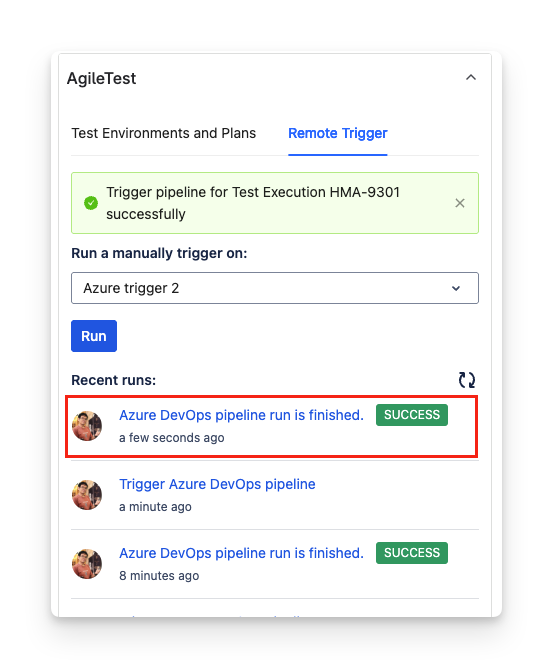
Once you include this part in your YAML file, on pipeline’s completion, a history log with pipeline status will be added on the right panel of the execution issue screen as below.
Should you need any assistance or further AgileTest inquiries, contact our 24/7 Support Desk
.png)