.png)
Test Case Calculation Scope refers to selecting test cases as the source for calculating a requirement’s status. When this scope is applied, AgileTest evaluates only the linked test cases and their test case statuses to determine the requirement status.
In AgileTest, there are 7 commonly used Test Case statuses, each representing a different execution outcome
-
Failed : The test case was executed and produced a result that did not match the expected outcome. An issue was identified and needs investigation or fixing.
-
Pass : The test case was executed successfully, and the actual result matched the expected result.
-
Retest : The test case needs to be executed again, typically after a related defect has been fixed or changes have been made that may affect the outcome.
-
query : The test case execution result is unclear or requires clarification. Additional information, discussion, or confirmation is needed before a final status can be assigned.
-
skipped : The test case was intentionally not executed during a test run, usually due to scope decisions, time constraints, or because it was not applicable.
-
todo : The test case has not been executed yet and is planned to be run.
-
blocked : The test case could not be executed due to external dependencies or issues, such as missing test data, environment problems, or unresolved defects.
Based on these Test Case statuses, AgileTest calculates the Requirement Status to reflect the overall testing state of each requirement.
Currently, there are 6 types of Requirement Status: NOK ; not run ; Unknown ; ok ; Uncovered ; covered Let’s explore what each of these Requirement Status types represents and how they are calculated.
1. Apply Test Case Scope
To apply Test Case Scope for the Requirement Status calculation, follow these steps:
-
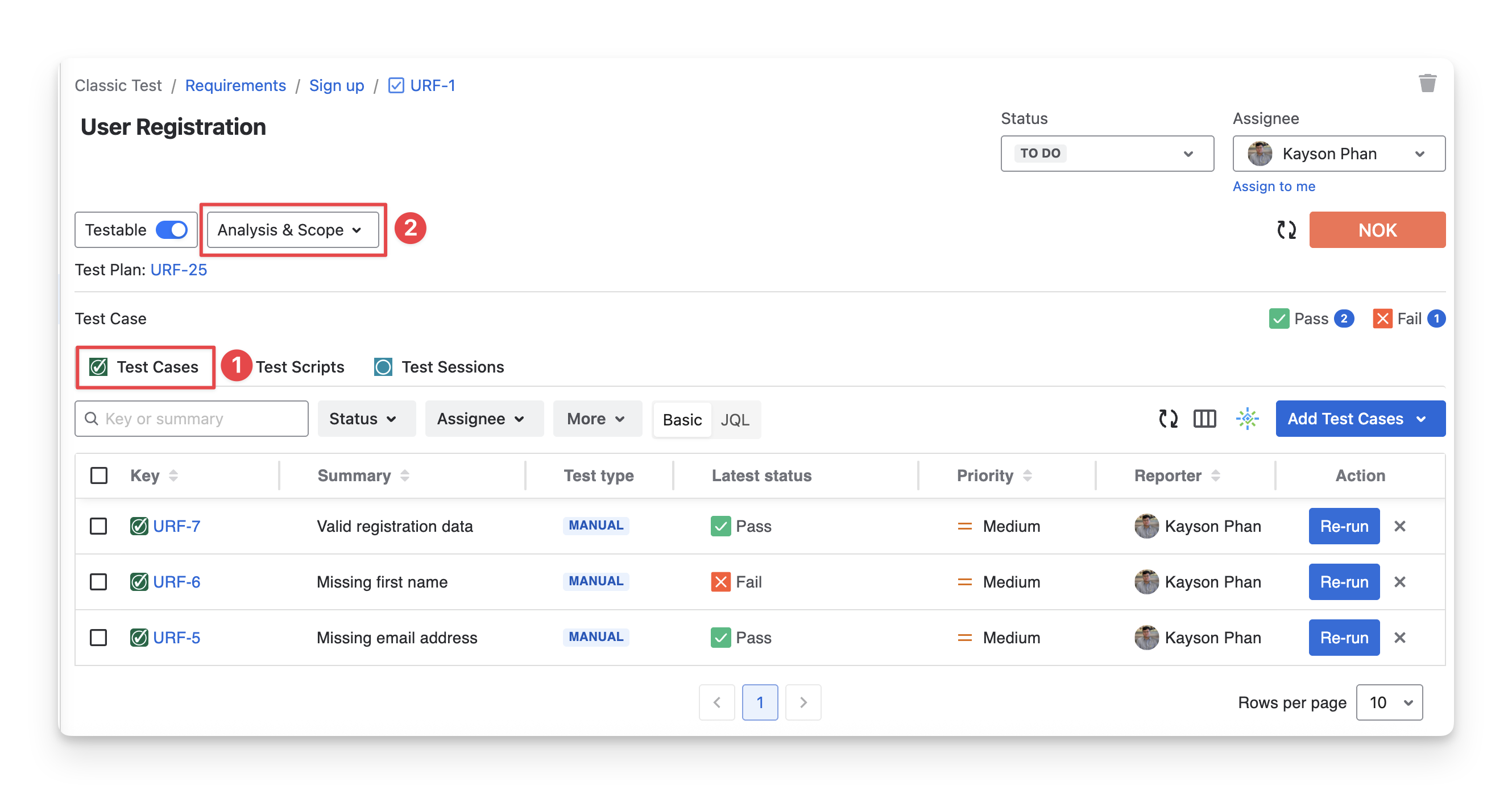
Choose the Test Cases tab in the Requirement Detail Screen.
-
Click the “Analysis & Scope” box.
-
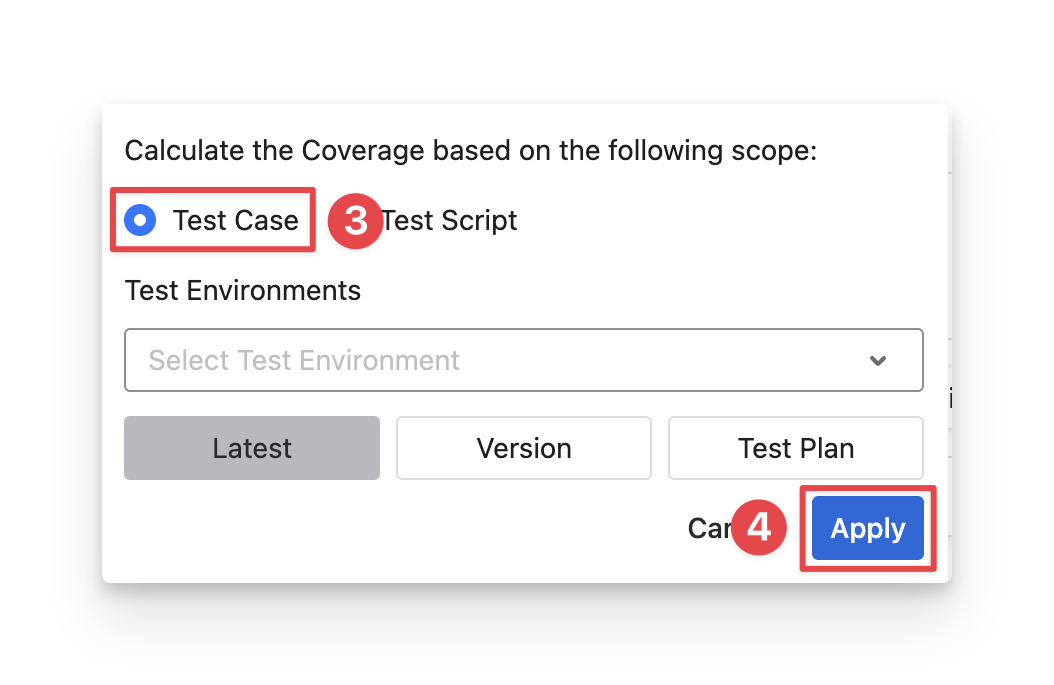
Select the “Test Case” scope. You can apply filters to limit the test cases included in the calculation
-
Test Environments: Filters test cases based on the environment where they are executed, such as Development, Staging, or Production. This helps you calculate the requirement status using results from a specific environment only.
-
Version: Filters test cases by the application version being tested. This is useful when you want to evaluate the requirement status for a particular release or build.
-
Test Plan: Filters test cases that belong to a specific test plan. This allows you to calculate the requirement status based on the testing scope defined in that plan.
-
Click the “Apply” button to calculate the Requirement Status.
2. Requirement Status Explanation
2.1 NOK
NOK means that the requirement is not yet passable within the current testing scope due to one or more failed test cases.
Calculation mechanism:
A requirement has status = NOK
IF: at least 1 linked test case with the Status = Failed
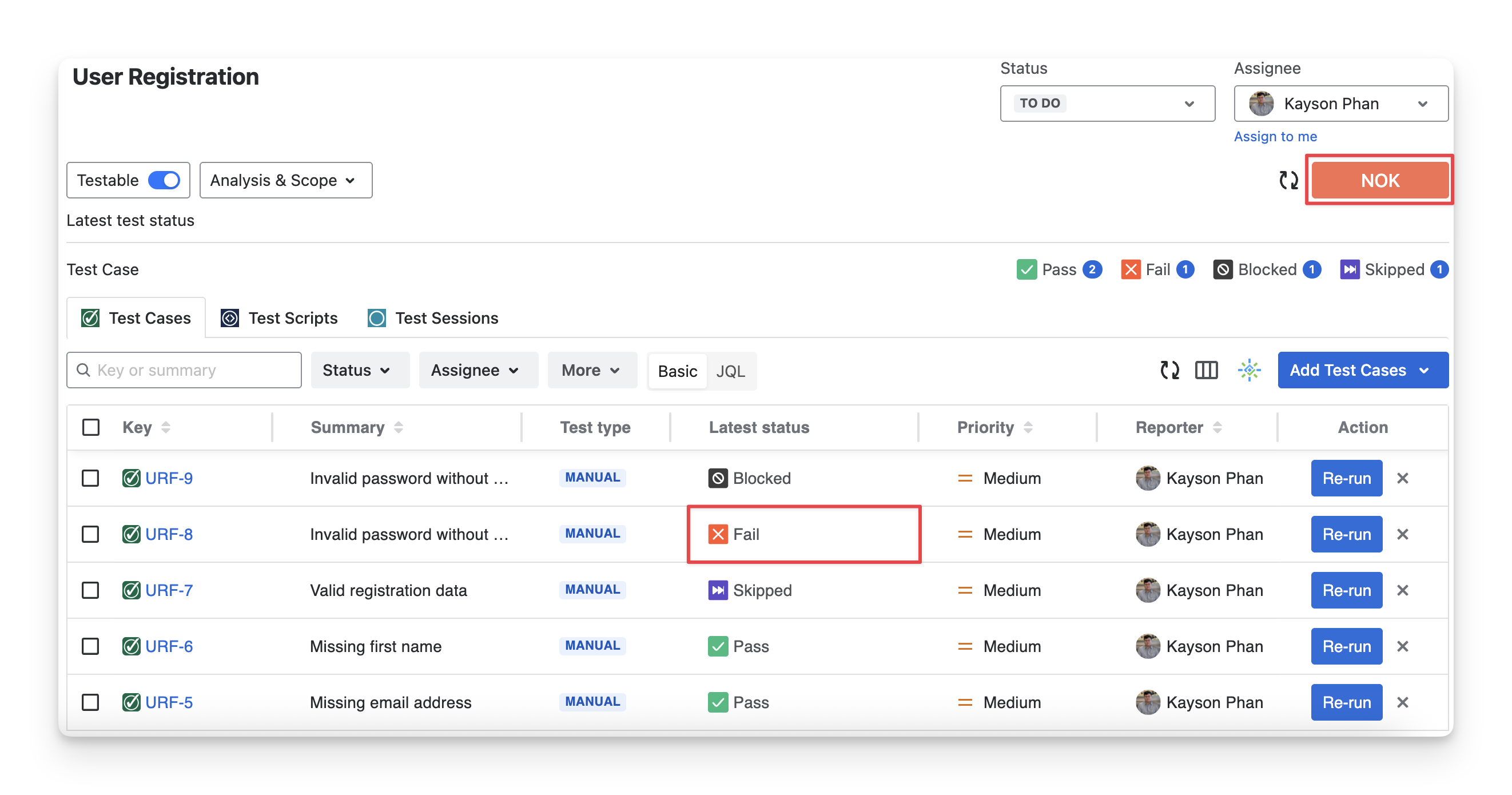
Example: This requirement has 1 Failed test case, so it has the NOK status, regardless of other test case statuses.
Other examples:
|
|
Test Case 1 |
Test Case 2 |
Test Case 3 |
Requirement Status |
|---|---|---|---|---|
|
Scenario 1 |
Failed |
Pass |
Pass |
NOK |
|
Scenario 2 |
Skipped |
Failed |
Todo |
NOK |
|
Scenario 3 |
Query |
Blocked |
Failed |
NOK |
2.2 NOT RUN
Not run means that the requirement cannot yet be evaluated because its linked test cases have not been executed.
Calculation mechanism:
A requirement has a status = Not run
IF: at least 1 linked test case with the status = Todo
AND: no linked test cases with the status = Failed
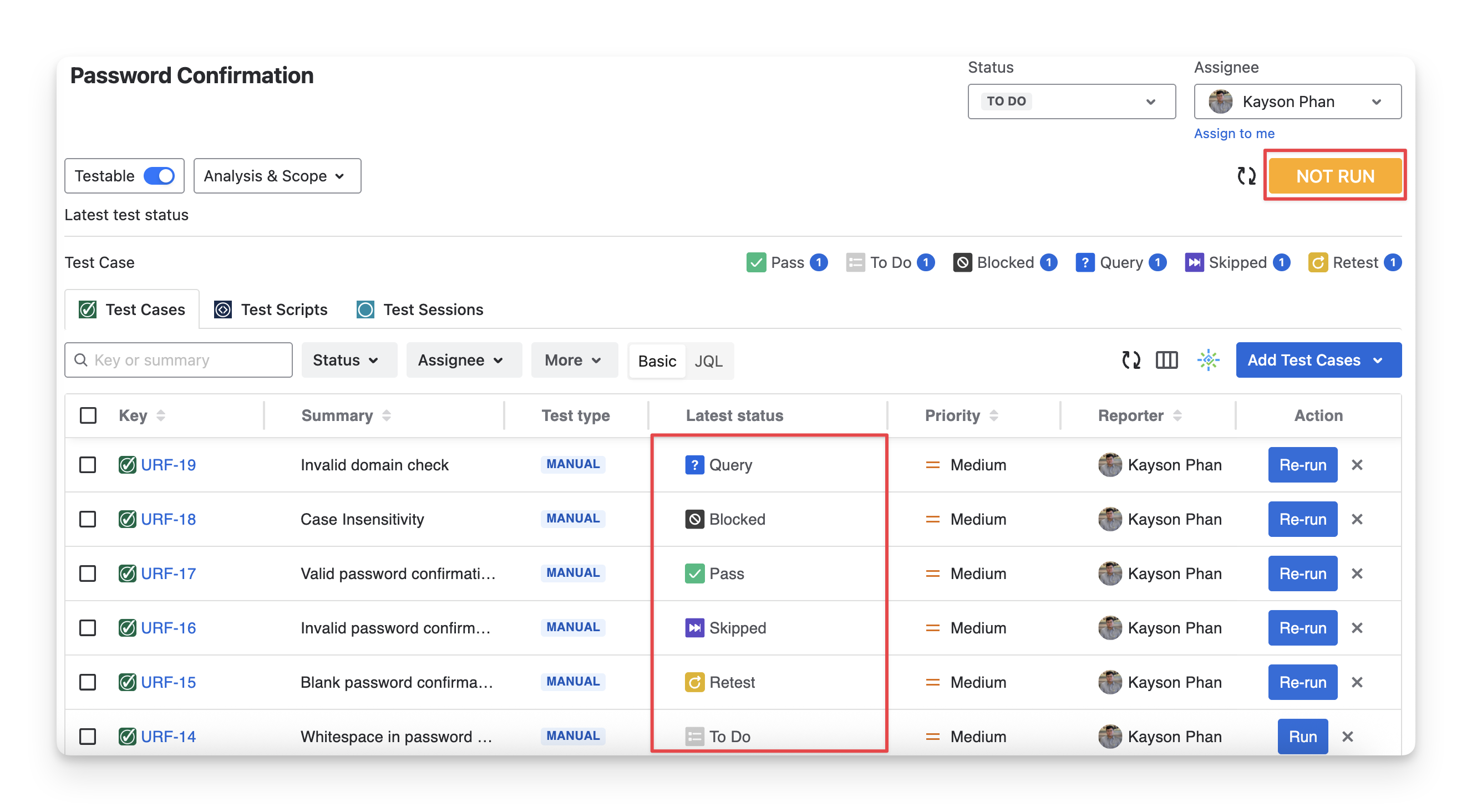
Example: This requirement has 1 Todo test case and does not have any Failed ones, so it has the Not run status.
Other examples:
|
|
Test Case 1 |
Test Case 2 |
Test Case 3 |
Requirement Status |
|---|---|---|---|---|
|
Scenario 1 |
Query |
Pass |
Todo |
NOT RUN |
|
Scenario 2 |
Skipped |
Failed |
Todo |
NOK |
|
Scenario 3 |
Pass |
Todo |
Blocked |
NOT RUN |
2.3 UNKNOWN
Unknown means that the requirement cannot yet be confirmed within the current testing scope because some linked test cases have neither passed nor failed, making the overall result inconclusive.
Calculation mechanism:
A requirement has a status = Unknown
IF: at least 1 linked test case with the status = retest / blocked or query
AND: no linked test case with the status = Todo or Failed
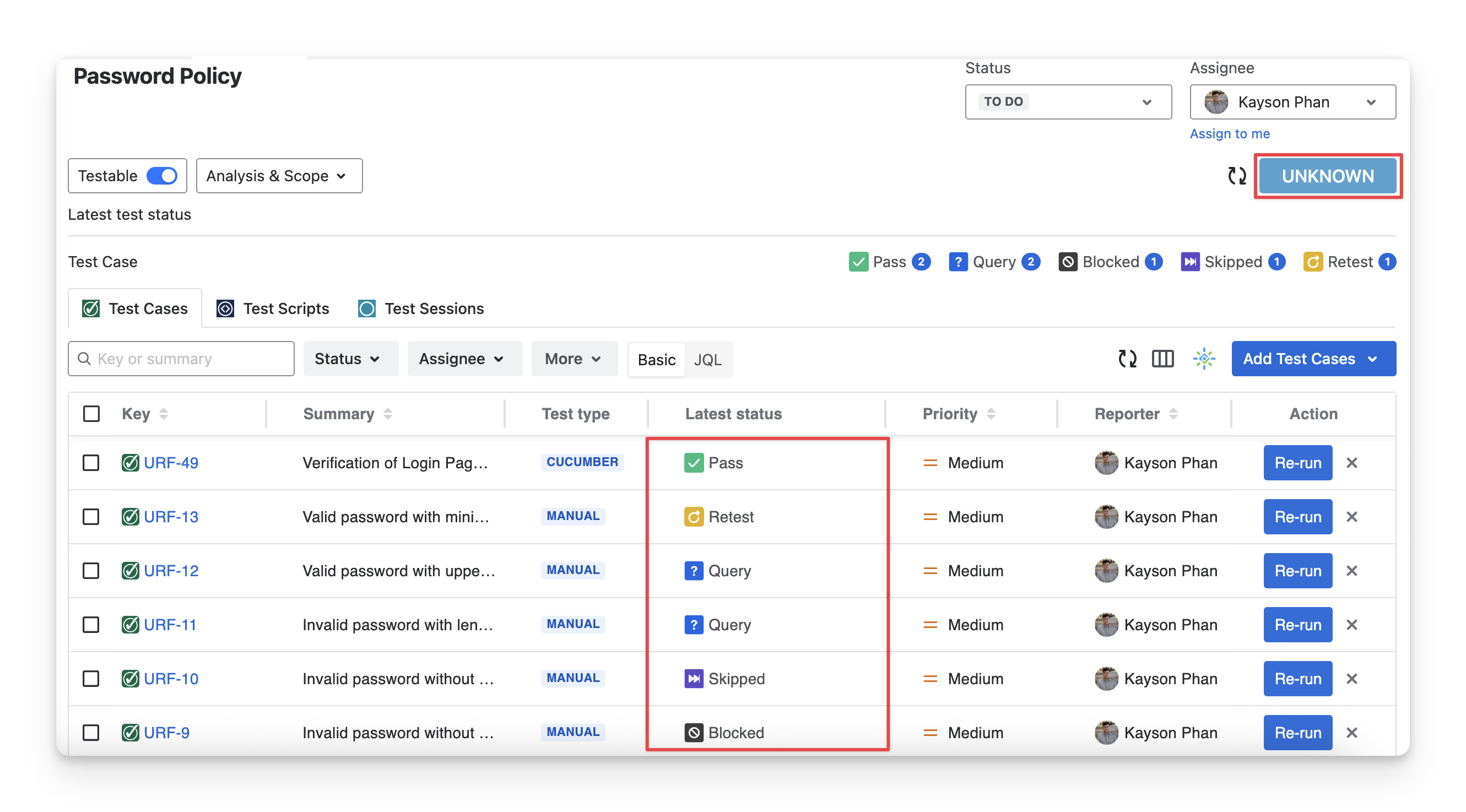
Example: This requirement has no Todo and Failed test cases, and it has some test cases with the query , blocked and retest statuses, so it has the Unknown status.
Other examples:
|
|
Test Case 1 |
Test Case 2 |
Test Case 3 |
Requirement Status |
|---|---|---|---|---|
|
Scenario 1 |
Query |
Blocked |
Pass |
UNKNOWN |
|
Scenario 2 |
Pass |
Failed |
Todo |
NOK |
|
Scenario 3 |
Pass |
Todo |
Pass |
NOT RUN |
2.4 OK
Ok means that the requirement can be considered successfully validated within the current testing scope because all linked test cases have passed.
Calculation mechanism:
A requirement has a status = OK
IF: all linked test cases have the Pass or skipped status
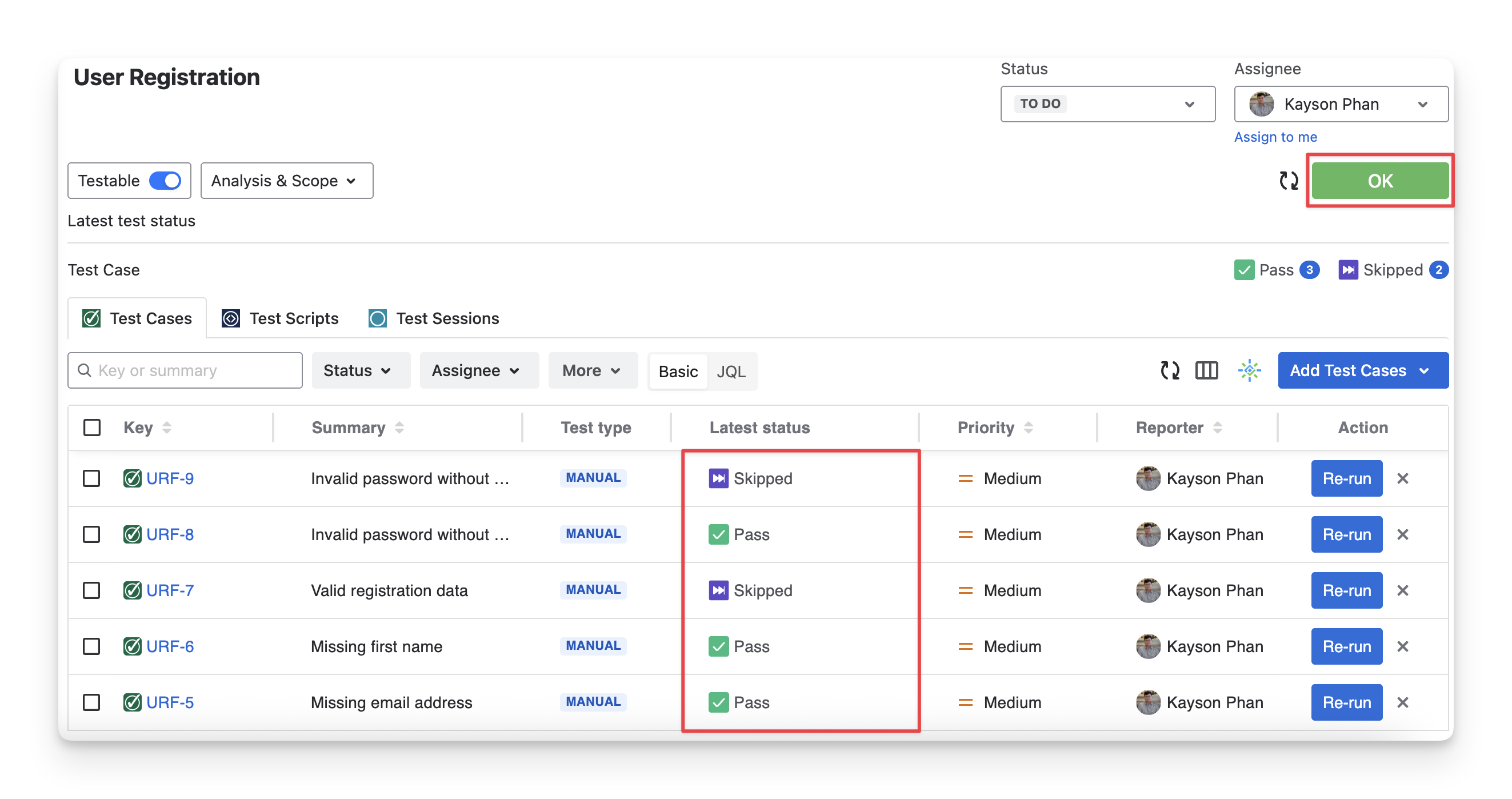
Example: This requirement has only Pass and skipped test cases, so it has the OK status.
Other examples:
|
|
Test Case 1 |
Test Case 2 |
Test Case 3 |
Requirement Status |
|---|---|---|---|---|
|
Scenario 1 |
Pass |
Pass |
Skipped |
OK |
|
Scenario 2 |
Skipped |
Failed |
Skipped |
NOK |
|
Scenario 3 |
Pass |
Skipped |
Query |
UNKNOWN |
2.5 UNCOVERED
Uncovered means that the requirement cannot be evaluated because no test cases are linked to it within the current testing scope.
Calculation mechanism:
A requirement has the status = uncovered
IF: no test run items and test cases are linked to it
AND: no test session items are linked to it
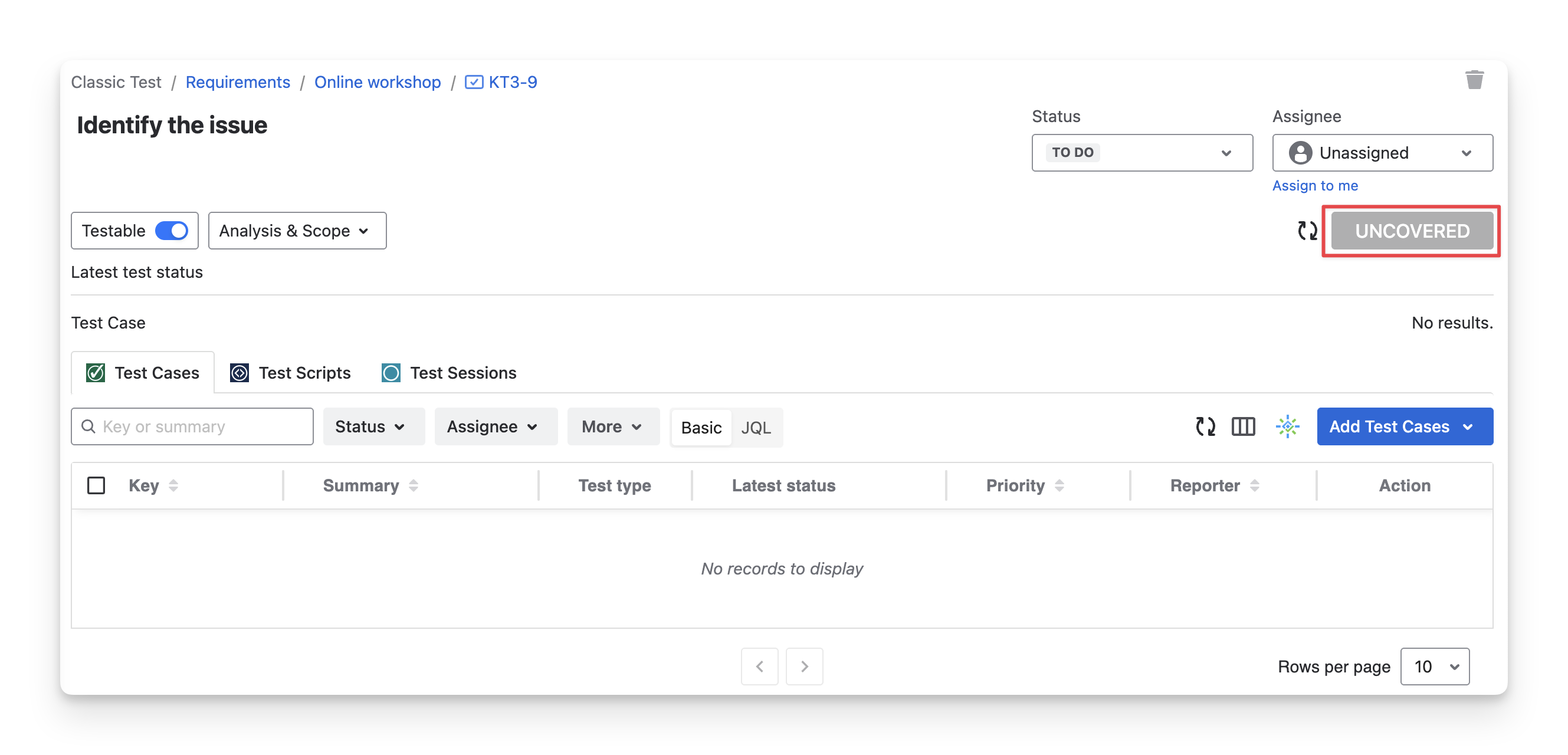
Example: This requirement has no linked test run items, test cases, or test session items, so it has the uncovered status.
Other examples:
|
|
Test Case 1 |
Test Case 2 |
Test Case 3 |
Requirement Status |
|---|---|---|---|---|
|
Scenario 1 |
- |
- |
- |
UNCOVERED |
|
Scenario 2 |
- |
- |
Todo |
NOT RUN |
|
Scenario 3 |
- |
Skipped |
- |
OK |
2.6 COVERED
covered means that the requirement is only linked with Exploratory tests.
Calculation mechanism:
A requirement gets the status = Covered
IF: at least 1 test session linked to it
AND: no test cases, test run items are linked to the requirement.
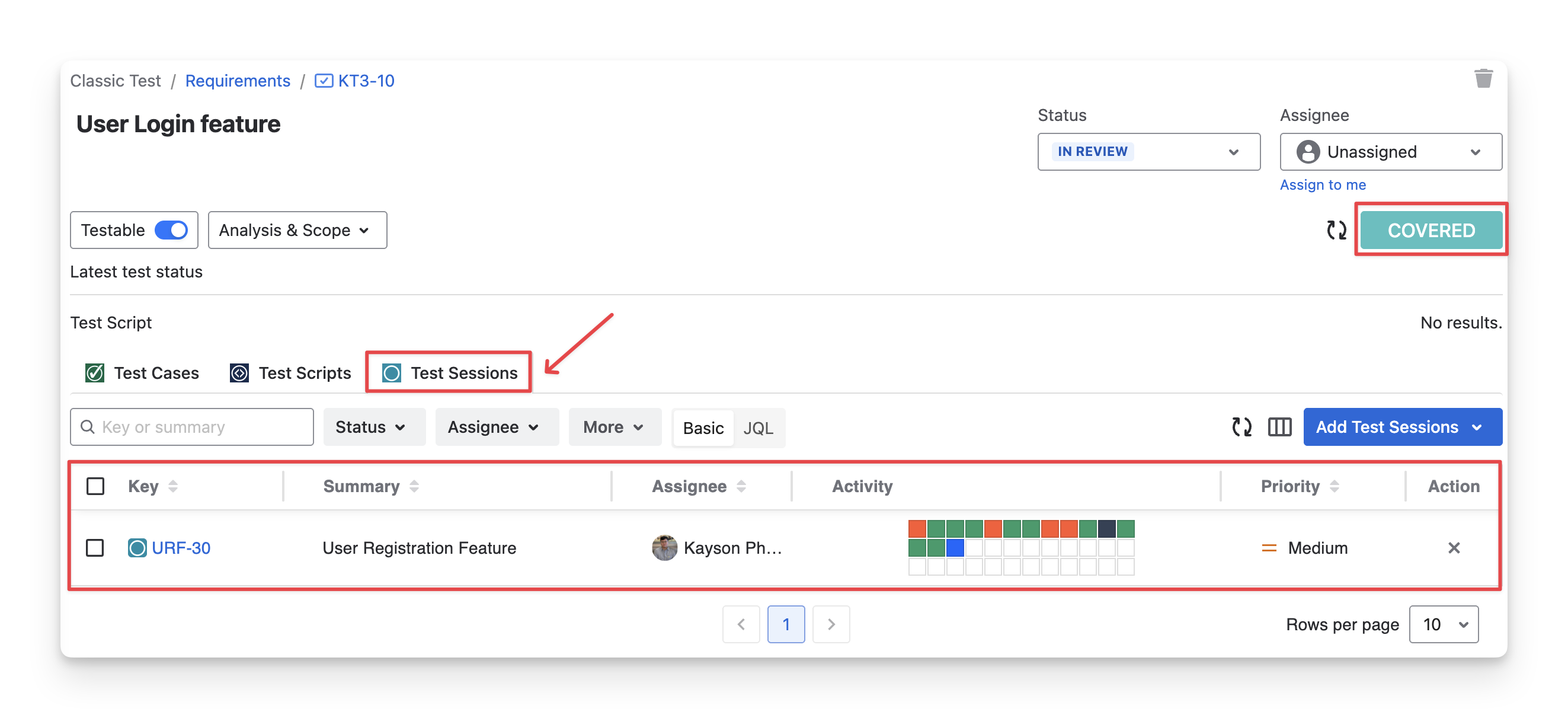
Example: This requirement is only linked with one test session, so it has the status Covered
Should you need any assistance or further AgileTest inquiries, contact our 24/7 Support Desk!