Skip table of contents

Robot framework XML result

There are 2 approaches to importing Robot Framework XML Result files using the API:

This Robot framework supports only Generic test cases. Test step details for other types will be excluded from the parsed results.

1. Import Test Result only

This approach allows you to quickly upload test results to AgileTest without needing to include extra metadata like test execution timestamps, environment details, or other specific execution parameters.

You can locate the endpoint at the POST /ds/test-executions/robot in the API document.
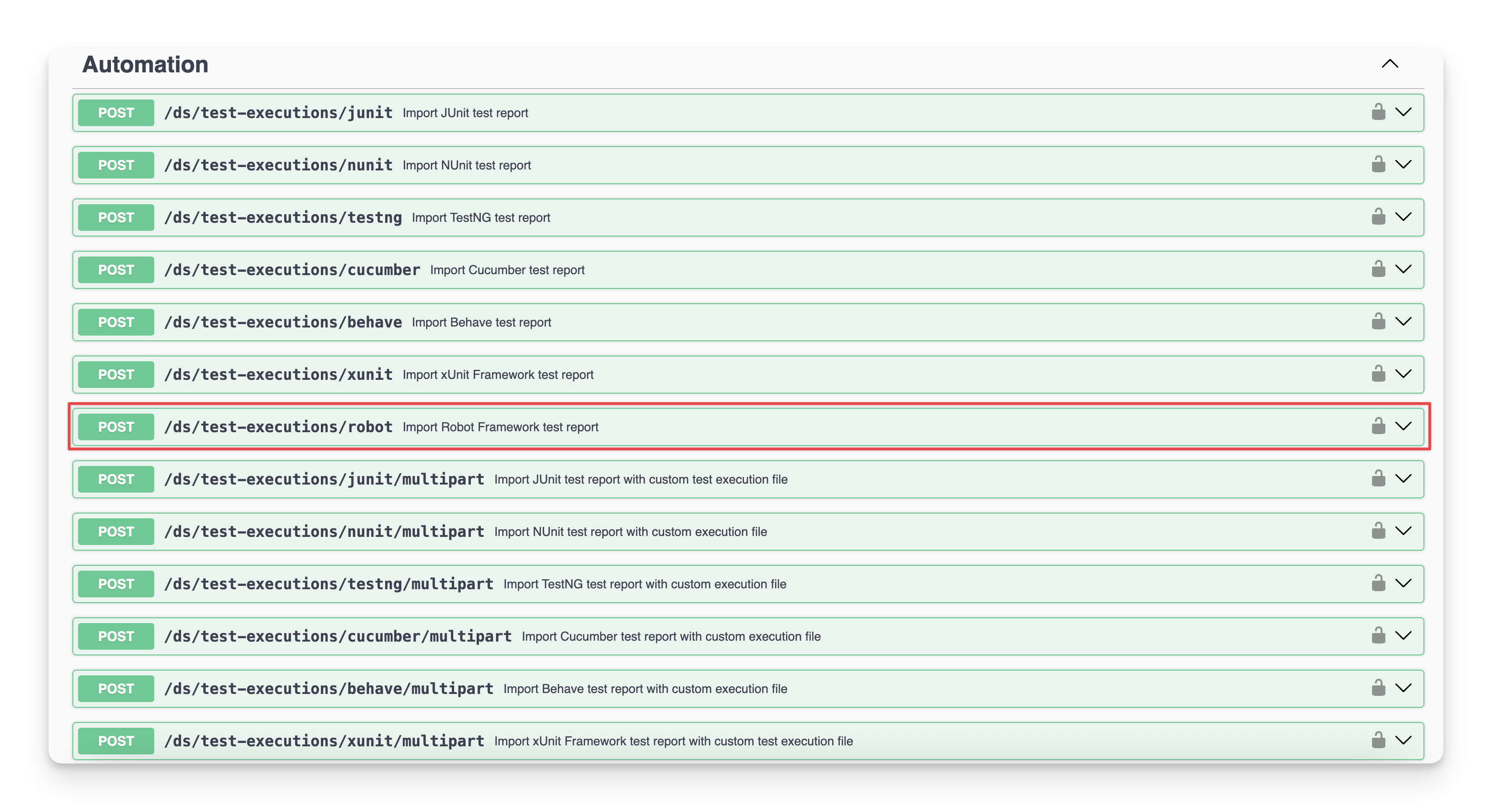
When you click on the 🔽 button, a dialog will appear. Here you can input your information for the test result file upload.
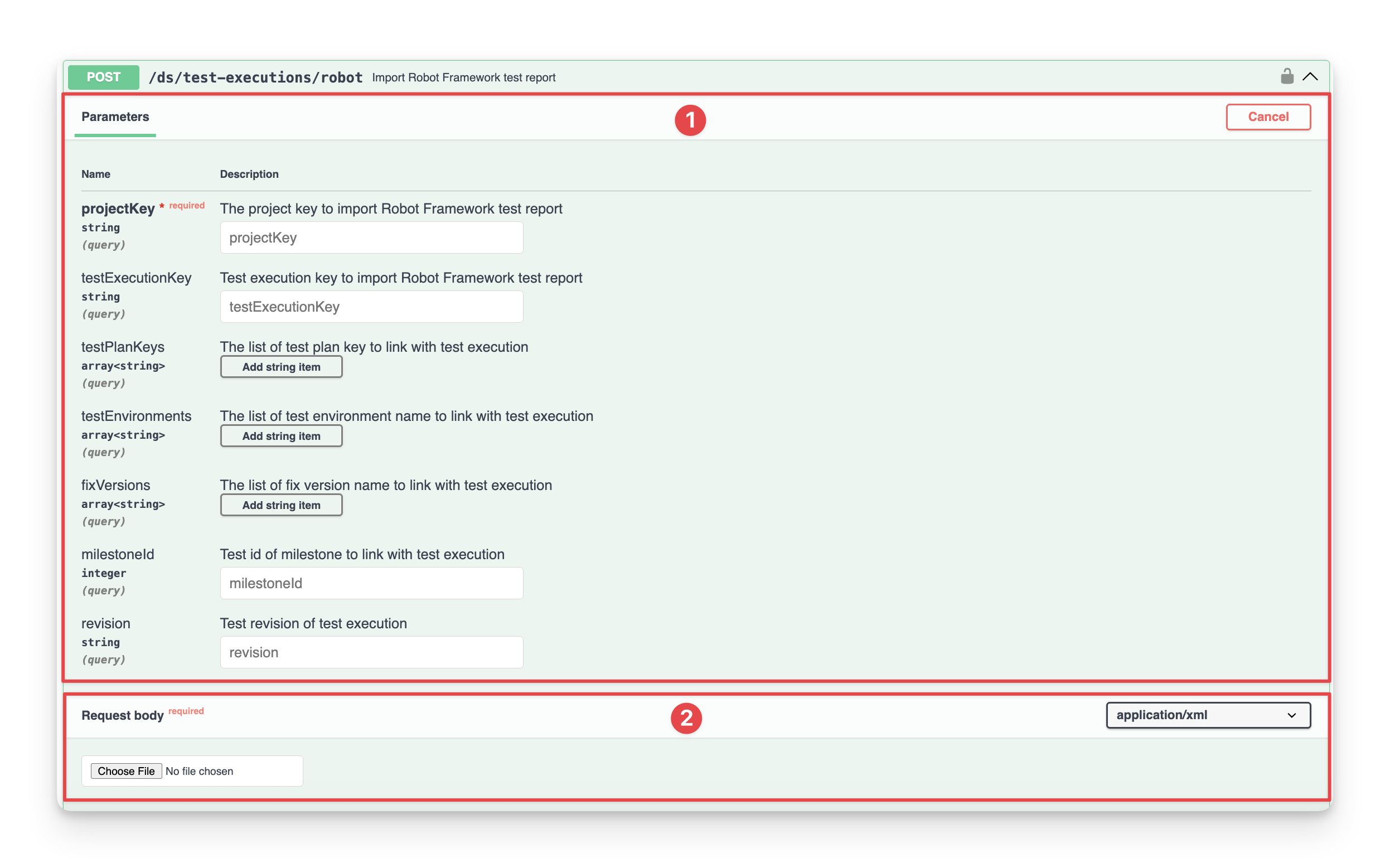
There are 2 main sections:

  • Parameters: fields that you define as key parameters required to make a successful API request. These parameters include:

Parameters

Type

Required

Description

projectKey

string

Key of the project where the test results will be imported.

milestoneId

integer


Milestone id to link to Test execution.

testExecutionKey

string


Test execution key to import test report.

testPlanKeys

array[string]


Test plan key to import test report.

If you specify a Test Plan, the tests will automatically be added to it if they are not already included.

testEnvironments

array[string]


A string containing a list of test environments separated by ",".

fixVersions

array[string]


A string containing a list of fixVersions separated by “,”.

revision

string


Revision to link to Test execution.

  • Request body: where you can input an XML file, which is a Robot framework report that is going to be imported.

Test result example
CODE
<?xml version="1.0" encoding="UTF-8"?>
<robot generator="Robot 7.1 (Python 3.13.0 on darwin)" generated="2024-11-06T08:10:19.736165" rpa="false" schemaversion="5">
<suite id="s1" name="Tests" source="/Users/thachnguyen/Work/autotest/agile-test-sample-projects/robot/shoppingapp/tests">
<suite id="s1-s1" name="Shopping App Tests" source="/Users/thachnguyen/Work/autotest/agile-test-sample-projects/robot/shoppingapp/tests/shopping_app_tests.robot">
<test id="s1-s1-t1" name="Create Cart And Add Product" line="15">
<kw name="Create Cart">
<kw name="Log" owner="BuiltIn">
<msg time="2024-11-06T08:10:19.763580" level="INFO">Cart created.</msg>
<arg>Cart created.</arg>
<doc>Logs the given message with the given level.</doc>
<status status="PASS" start="2024-11-06T08:10:19.763526" elapsed="0.000079"/>
</kw>
<status status="PASS" start="2024-11-06T08:10:19.763143" elapsed="0.000500"/>
</kw>
<kw name="Create Product">
<msg time="2024-11-06T08:10:19.764052" level="FAIL">No keyword with name 'Create Product' found.</msg>
<arg>${PRODUCT_NAME}</arg>
<arg>${PRODUCT_PRICE}</arg>
<arg>${PRODUCT_STOCK}</arg>
<status status="FAIL" start="2024-11-06T08:10:19.764040" elapsed="0.000029">No keyword with name 'Create Product' found.</status>
</kw>
<kw name="Add Item To Cart">
<arg>${PRODUCT_NAME}</arg>
<status status="NOT RUN" start="2024-11-06T08:10:19.764131" elapsed="0.000006"/>
</kw>
<kw name="Get Total Price">
<var>${total_price}</var>
<status status="NOT RUN" start="2024-11-06T08:10:19.764207" elapsed="0.000007"/>
</kw>
<kw name="Should Be Equal As Numbers" owner="BuiltIn">
<arg>${total_price}</arg>
<arg>${PRODUCT_PRICE}</arg>
<doc>Fails if objects are unequal after converting them to real numbers.</doc>
<status status="NOT RUN" start="2024-11-06T08:10:19.764257" elapsed="0.000007"/>
</kw>
<doc>This test creates a cart, adds a product, and verifies the total price.</doc>
<status status="FAIL" start="2024-11-06T08:10:19.762860" elapsed="0.001470">No keyword with name 'Create Product' found.</status>
</test>
<test id="s1-s1-t2" name="Apply Discount To Cart" line="23">
<kw name="Get Total Price">
<kw name="Get Cart Total Price">
<msg time="2024-11-06T08:10:19.764928" level="FAIL">No keyword with name 'Get Cart Total Price' found. Did you mean:
    Get Total Price</msg>
<var>${total_price}</var>
<status status="FAIL" start="2024-11-06T08:10:19.764918" elapsed="0.000023">No keyword with name 'Get Cart Total Price' found. Did you mean:
    Get Total Price</status>
</kw>
<kw name="Log" owner="BuiltIn">
<arg>Total Price: ${total_price}</arg>
<doc>Logs the given message with the given level.</doc>
<status status="NOT RUN" start="2024-11-06T08:10:19.764980" elapsed="0.000007"/>
</kw>
<return>
<value>${total_price}</value>
<status status="NOT RUN" start="2024-11-06T08:10:19.765005" elapsed="0.000009"/>
</return>
<var>${total_price}</var>
<status status="FAIL" start="2024-11-06T08:10:19.764548" elapsed="0.000503">No keyword with name 'Get Cart Total Price' found. Did you mean:
    Get Total Price</status>
</kw>
<kw name="Apply Discount">
<arg>${DISCOUNT}</arg>
<status status="NOT RUN" start="2024-11-06T08:10:19.765106" elapsed="0.000006"/>
</kw>
<kw name="Get Total Price">
<var>${total_price_after_discount}</var>
<status status="NOT RUN" start="2024-11-06T08:10:19.765164" elapsed="0.000007"/>
</kw>
<kw name="Evaluate" owner="BuiltIn">
<var>${expected_price}</var>
<arg>${total_price} - ${DISCOUNT}</arg>
<doc>Evaluates the given expression in Python and returns the result.</doc>
<status status="NOT RUN" start="2024-11-06T08:10:19.765208" elapsed="0.000006"/>
</kw>
<kw name="Should Be Equal As Numbers" owner="BuiltIn">
<arg>${total_price_after_discount}</arg>
<arg>${expected_price}</arg>
<doc>Fails if objects are unequal after converting them to real numbers.</doc>
<status status="NOT RUN" start="2024-11-06T08:10:19.765250" elapsed="0.000006"/>
</kw>
<doc>This test applies a discount to the cart and verifies the final price.</doc>
<status status="FAIL" start="2024-11-06T08:10:19.764406" elapsed="0.000902">No keyword with name 'Get Cart Total Price' found. Did you mean:
    Get Total Price</status>
</test>
<test id="s1-s1-t3" name="Set Delivery Address And Date" line="31">
<kw name="Set Delivery Address">
<kw name="Log" owner="BuiltIn">
<msg time="2024-11-06T08:10:19.765693" level="INFO">Delivery address set to: 123 Main St, Ho Chi Minh City, Binh Duong, 700000</msg>
<arg>Delivery address set to: ${street}, ${city}, ${state}, ${zip}</arg>
<doc>Logs the given message with the given level.</doc>
<status status="PASS" start="2024-11-06T08:10:19.765623" elapsed="0.000087"/>
</kw>
<arg>${ADDRESS_STREET}</arg>
<arg>${ADDRESS_CITY}</arg>
<arg>${ADDRESS_STATE}</arg>
<arg>${ADDRESS_ZIP}</arg>
<status status="PASS" start="2024-11-06T08:10:19.765494" elapsed="0.000237"/>
</kw>
<kw name="Set Delivery Date">
<kw name="Log" owner="BuiltIn">
<msg time="2024-11-06T08:10:19.765892" level="INFO">Delivery date set to: 2024-10-20</msg>
<arg>Delivery date set to: ${date}</arg>
<doc>Logs the given message with the given level.</doc>
<status status="PASS" start="2024-11-06T08:10:19.765851" elapsed="0.000055"/>
</kw>
<arg>2024-10-20</arg>
<status status="PASS" start="2024-11-06T08:10:19.765779" elapsed="0.000145"/>
</kw>
<doc>This test sets a delivery address and date for the order.</doc>
<status status="PASS" start="2024-11-06T08:10:19.765373" elapsed="0.000592"/>
</test>
<status status="FAIL" start="2024-11-06T08:10:19.761963" elapsed="0.004131"/>
</suite>
<status status="FAIL" start="2024-11-06T08:10:19.736638" elapsed="0.029610"/>
</suite>
<statistics>
<total>
<stat pass="1" fail="2" skip="0">All Tests</stat>
</total>
<tag>
</tag>
<suite>
<stat pass="1" fail="2" skip="0" id="s1" name="Tests">Tests</stat>
<stat pass="1" fail="2" skip="0" id="s1-s1" name="Shopping App Tests">Tests.Shopping App Tests</stat>
</suite>
</statistics>
<errors>
<msg time="2024-11-06T08:10:19.762668" level="ERROR">Error in file '/Users/thachnguyen/Work/autotest/agile-test-sample-projects/robot/shoppingapp/tests/shopping_app_tests.robot' on line 2: Importing library 'ShoppingAppLibrary' failed: ModuleNotFoundError: No module named 'ShoppingAppLibrary'
Traceback (most recent call last):
  None
PYTHONPATH:
  /Users/thachnguyen/Work/autotest/agile-test-sample-projects/robot/.venv/bin
  /opt/homebrew/Cellar/python@3.13/3.13.0_1/Frameworks/Python.framework/Versions/3.13/lib/python313.zip
  /opt/homebrew/Cellar/python@3.13/3.13.0_1/Frameworks/Python.framework/Versions/3.13/lib/python3.13
  /opt/homebrew/Cellar/python@3.13/3.13.0_1/Frameworks/Python.framework/Versions/3.13/lib/python3.13/lib-dynload
  /Users/thachnguyen/Work/autotest/agile-test-sample-projects/robot/.venv/lib/python3.13/site-packages</msg>
</errors>
</robot>

Learn more about the Robot framework.

Then, you will receive an output example

Output example
CODE
{
    "id": "321016",
    "key": "ATP-1856",
    "url": "https://company.atlassian.net/browse/ATP-1856"
}

In case you want to use the command line, file pipeline, and other tools instead of API docs, you can copy the curl and input the token to import test results.

CODE
curl -X 'POST' \
  'https://api.agiletest.app/ds/test-executions/robot?projectKey=ATP' \
  -H 'accept: application/json' \
  -H 'Authorization: JWT <token>' \
  -H 'Content-Type: application/xml' \
  --data-binary '@my-report.xml'

In that, <token> is the result from the Get Authenticated step.

2. Import Test Result with New Execution Details

This approach allows you to import Robot Framework XML test results while including additional execution details, such as timestamps, environment details, test execution keys, and other specific parameters related to the test executions.

You can locate the endpoint at the POST /ds/test-executions/robot/multipart in the API document.
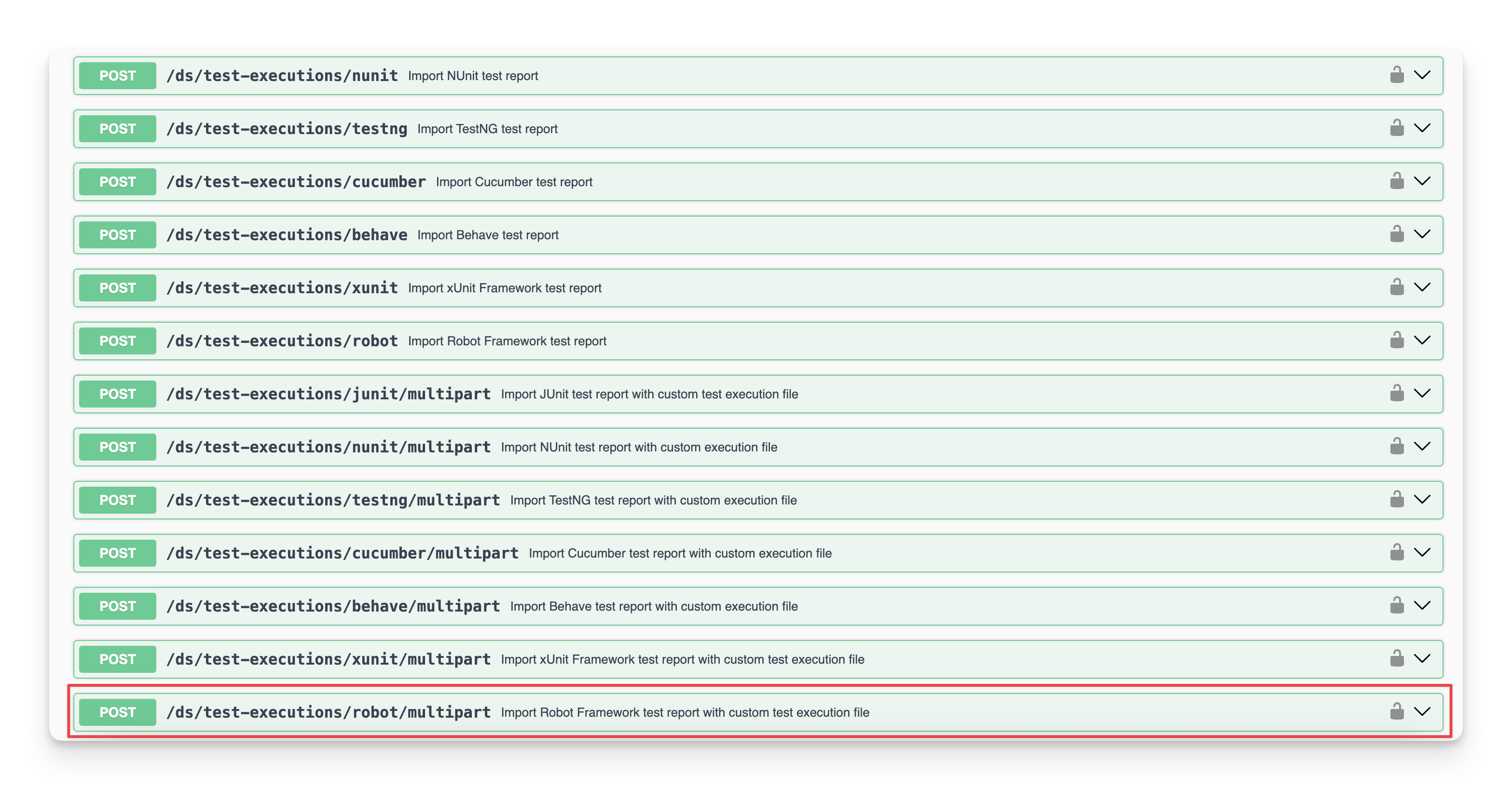
For this request, it does not require any parameters. Instead, you need to submit two separate files:
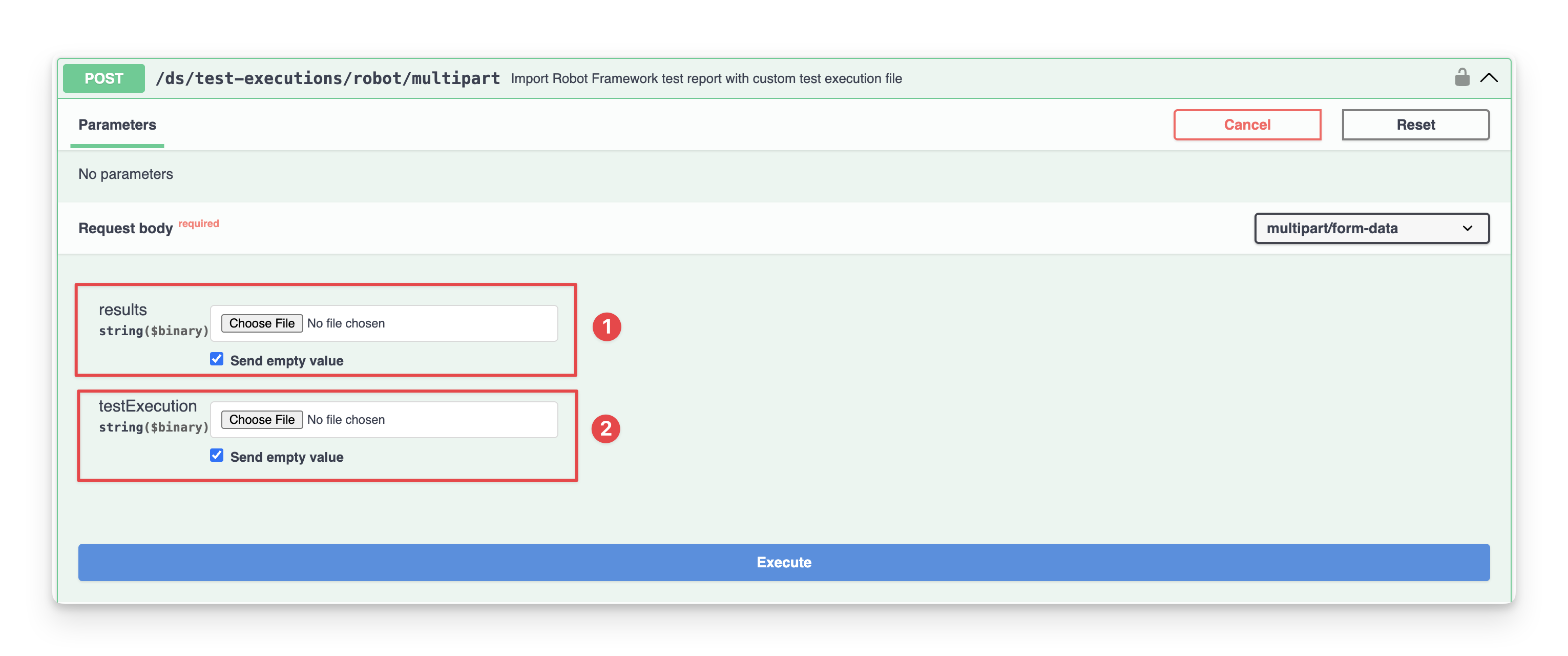
  • A file containing the test results to import. This file resembles the test result files used in the Import Test Result only approach.

  • A file containing the test execution details. This file has some fields, and each of these fields serves a specific purpose in creating and organizing the test execution:

    • The fields object contains standard issue creation information, like what project it belongs to and what type of issue it is. It has 3 compulsory fields summary, project.id, and issuetype.id. Additionally, you can include other optional Jira fields, such as labels, priority, or any custom fields that your Jira instance uses.

    • The agileTestFields object contains Agile Test-specific information for linking the execution to milestones and test plans, both of which are optional.

Field

Group

Type

Required

Description

summary

fields

string

Summary of Test execution issue that will be created.

project.id

string

Project ID in which the Test execution will be created.

issuetype.id

string

The identifier specifying the type of issue to be created.


milestoneId

agileTestFields

integer


The identifier of the milestone that this test execution should be associated with.

testPlanKeys

array of string


An array of issue keys of Test plan that this test execution is related to.

testEnvironments

array of string


A string containing a list of test environments separated by ",".

fixVersions

array of string


A string containing a list of fixVersions separated by “,”.

revision

string


Revision to link to Test execution.

Test Execution detail example
CODE
{
  "fields": {
    "summary": "Regression test",
    "project": {
      "id": "17110"
    },
    "issuetype": {
      "id": "16396"
    }
  },
  "agileTestFields": {
    "milestoneId": 5555,
    "testPlanKeys": ["ATP-364", "ATP-362"]
  }
}

Make sure all details provided are accurate and relevant; otherwise, the request will fail. For example, if the issuetype.id you specify a value that does not exist in the project with ID 17110, the system will return an error with the corresponding error code 400.

Then, you will receive an output example

Output example
CODE
{
  "id": "321348",
  "key": "ATP-1859",
  "url": "https://company.atlassian.net/browse/ATP-1859"
}

In case you want to use the command line, file pipeline, and other tools instead of API docs, you can copy the curl and input the token to import test results.

CODE
curl -X 'POST' \
  'https://api.agiletest.app/ds/test-executions/robot/multipart' \
  -H 'accept: application/json' \
  -H 'Authorization: JWT <token>' \
  -H 'Content-Type: multipart/form-data' \
  -F 'results=@my-report.xml;type=application/xml' \
  -F 'testExecution=@test-execution.json;type=application/json'

In that, <token> is the result from the Get Authenticated step.


Should you need any assistance or further AgileTest inquiries, contact our 24/7 Support Desk!

JavaScript errors detected

Please note, these errors can depend on your browser setup.

If this problem persists, please contact our support.