.png)
Release date:
We're excited to announce the latest major release of AssetIT!
Action required for admins
-
[For v3.6.0 and below] This version of AssetIT requires a manual upgrade to continue using the app.
-
[If applicable] If your workflow uses the AssetIT Public API, please regenerate your API credentials to keep your integration running.
AssetIT is now a Forge Standard app!
We're excited to announce that AssetIT is now a Forge Standard app on the Atlassian Marketplace. This upgrade brings improved security, performance, and long-term platform stability.
No features have been removed or changed. The app works the same way.
Regenerating API Credentials
The Forge Standard migration invalidates all previously generated API credentials. This affects administrators who have set up API credentials in AssetIT to integrate with external systems via the API Credentials.
If you haven't set up API credentials in AssetIT, no action is needed.
How to regenerate:
-
In AssetIT, go to ⚙️ Settings → API Credentials
-
Click Regenerate on your existing credential, or remove it and create a new one
-
Copy the new Client ID and Client Secret immediately — the secret is only shown once
-
Paste the new token into your integration to reconnect.
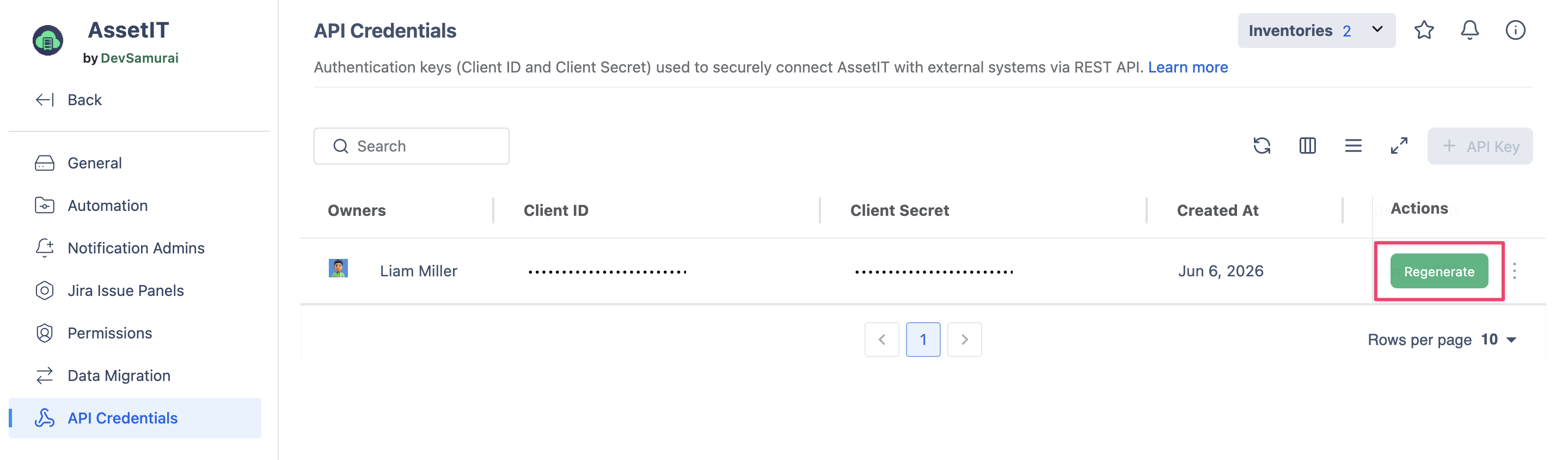
Each user can only hold one API key per instance. Remove the existing one first if you need a key for a different instance.
Need assistance? Please reach out to us at our Support Desk.